
Rate my Photoshop
Discussion


Had a quick go on Photoshop with the image of the Ariel Atom that the majority think was my best picture from the night.
I've gotten rid of the cars on either side, adjusted the levels a little bit and gotten rid of some of the light spots.
Let me know what you think!
Before:
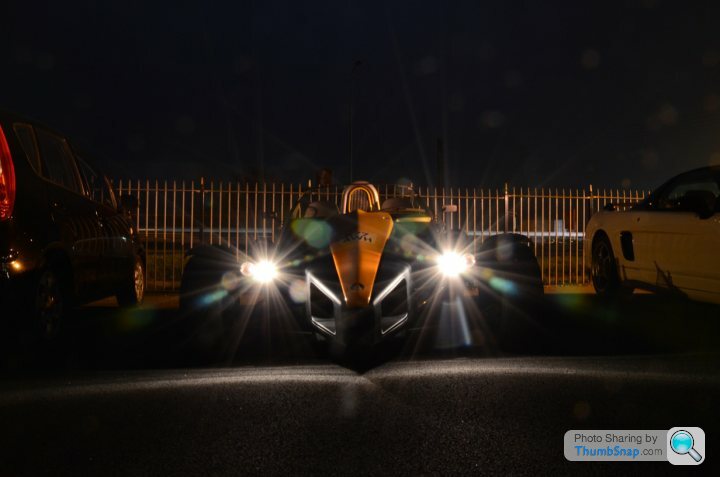
After:

What else should I be trying to enhance it?
Cheers
I've gotten rid of the cars on either side, adjusted the levels a little bit and gotten rid of some of the light spots.
Let me know what you think!
Before:
After:
What else should I be trying to enhance it?
Cheers
Morning. To be honest, there probably isn't a great deal more you can do to the car without it looking "forced". Excuse the pun, but the shot itself has slightly painted you into a corner from the start. The heavy influence from the headlights is quite prohibiting. My suggestion would have been to get a shot without the lights on first and the overlay the shot with the lamps lit and brush through using layer masks what you need. The shots must be exactly in pro for this so a tripod is a must and if the kit allows, use a remote to catch the shot rather than taking by hand. This way you can make most of the image edits without having to work around the light beams. A headlamp free shot would have enabled you to have an uninterrupted version of the car and you could comfortably enhance tyre treads, make the orange nose cone more symmetrical in it's lighting, "find" the lost wing mirror and generally pick out a little more detail. You've done one of the hardest bits quite well which is removing the surplus vehicles. Maybe a more dramtic sky would help as it is quite an aggresive looking car but in an environment that doesn't do it justice.
Not criticism, just an opinion. If you are serious about stepping up your ability, take a look on our website in the automotive section, particularly at the Porsche "Observatory" & "Tunnel" to see how radical end results can be achieved.
http://www.fb-imaging.co.uk
HTH, PP.
Not criticism, just an opinion. If you are serious about stepping up your ability, take a look on our website in the automotive section, particularly at the Porsche "Observatory" & "Tunnel" to see how radical end results can be achieved.
http://www.fb-imaging.co.uk
HTH, PP.
 Maybe you could rotate the car (or fence) to put them level with each other? The misalignment makes my autistic side twitch
Pixel Pusher said:
Morning. To be honest, there probably isn't a great deal more you can do to the car without it looking "forced". Excuse the pun, but the shot itself has slightly painted you into a corner from the start. The heavy influence from the headlights is quite prohibiting. My suggestion would have been to get a shot without the lights on first and the overlay the shot with the lamps lit and brush through using layer masks what you need. The shots must be exactly in pro for this so a tripod is a must and if the kit allows, use a remote to catch the shot rather than taking by hand. This way you can make most of the image edits without having to work around the light beams. A headlamp free shot would have enabled you to have an uninterrupted version of the car and you could comfortably enhance tyre treads, make the orange nose cone more symmetrical in it's lighting, "find" the lost wing mirror and generally pick out a little more detail. You've done one of the hardest bits quite well which is removing the surplus vehicles. Maybe a more dramtic sky would help as it is quite an aggresive looking car but in an environment that doesn't do it justice.
Not criticism, just an opinion. If you are serious about stepping up your ability, take a look on our website in the automotive section, particularly at the Porsche "Observatory" & "Tunnel" to see how radical end results can be achieved.
http://www.fb-imaging.co.uk
HTH, PP.
Cheers, the pics on your site all look great, I think I need to improve my eye for a good shot (or potentail for a good shot through photoshop). Not criticism, just an opinion. If you are serious about stepping up your ability, take a look on our website in the automotive section, particularly at the Porsche "Observatory" & "Tunnel" to see how radical end results can be achieved.
http://www.fb-imaging.co.uk
HTH, PP.
Is it possible to get natural shots of cars with headlights on without the light spots, any tips for doing it, or is it easier to photoshop all the way. If I'd have taken this one with the headlights off, getting the lighting right on the nose cose would have been difficult... So if I had taken one with the lights on and one with the lights off I would have had a reference for lighting... Something for the future, damn you hindsight.
greggers said:
Cheers, the pics on your site all look great, I think I need to improve my eye for a good shot (or potentail for a good shot through photoshop).
Is it possible to get natural shots of cars with headlights on without the light spots, any tips for doing it, or is it easier to photoshop all the way. If I'd have taken this one with the headlights off, getting the lighting right on the nose cose would have been difficult... So if I had taken one with the lights on and one with the lights off I would have had a reference for lighting... Something for the future, damn you hindsight.
Thanks for your kind words.Is it possible to get natural shots of cars with headlights on without the light spots, any tips for doing it, or is it easier to photoshop all the way. If I'd have taken this one with the headlights off, getting the lighting right on the nose cose would have been difficult... So if I had taken one with the lights on and one with the lights off I would have had a reference for lighting... Something for the future, damn you hindsight.
I'm fortunate to have the luxury of working with some very established car photographers who will shoot the car as a "toolkit" with separate exposures for almost every aspect of the vehicle, but then again, they have the time and the budget to do this. If you want to get more into this then good photography is paramount for giving you a good photoshop result. I take your point about lighting the nose cone, but any light on that without the main headlights on will give you basis for enhancement. Obviously I am unaware of your kit levels, but some simple reflectors (large sheets of white card) and directional lighting will bounce your light into the nose cone, pick out the suspension, tyre treads etc. You can then enhance this further, prior to overlaying the headlights element. It's better to have something there initially as opposed to having to create it.
http://www.pistonheads.co.uk/gassing/topic.asp?h=0...
If you haven't already, take a quick look at this topic. There are some very talented PH photographers on here who I'm sure would give much better shooting advice than I can. The main thing is; Don't give up.
Cheers, PP.
Gassing Station | Photography & Video | Top of Page | What's New | My Stuff