
Virgin Media Superhub 30/50/100mb
Discussion


Should be getting mine installed next week which I was looking forward to but I'm not reading good things about it in all honesty. The Superhub is a Modem & Router combined (wireless only connectivity). Personally I have everthing connected via ethernet cables as I prefer the stability. I know people can't connect more than 1 Xbox to the network but not sure if the same applies to Playstations. Also the superhub can only run on 1 bandwidth at a time so if something is connecting at a low bandwidth then everthing connects at that speed.
Does any have this already? If so does everything seem OK with regards to gaming?
Does any have this already? If so does everything seem OK with regards to gaming?
FellowPazzini said:
So your saying the best way is to keep everything connected to my current Router (Virgin provided) as it is then have the router wireless to the superhub.
It is one of the options, and it would save you having concerns about some part of your network being wired, some wireless as well as preventing problems with different speed grades connecting to the wireless hub, making it run at the slowest speed.But, there are few other options as well ... Let someone else chip in and see what you think.
You would need to set the wireless access point as the DMZ server on the superhub to make sure there won't be too many problems with NAT translations, etc.
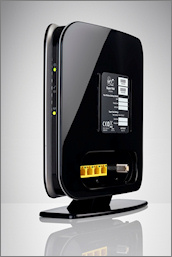
I got one the other day. It seems to work OK, and the speeds are faster than the previous modem/router/access point combination.
[/url]http://www.speedtest.net/result/1145870895.png[/url]
Setting it up was pretty easy - had to ring an activation number then click through a few screens in a browser (which didn't work in Firefox 4 beta, but did in 3.6).
The only slight downside is that the wireless signal doesn't appear to be quite as strong as the access point I had before, but if it proves a problem I can put that elsewhere in the house as a repeater.
[/url]http://www.speedtest.net/result/1145870895.png[/url]
Setting it up was pretty easy - had to ring an activation number then click through a few screens in a browser (which didn't work in Firefox 4 beta, but did in 3.6).
The only slight downside is that the wireless signal doesn't appear to be quite as strong as the access point I had before, but if it proves a problem I can put that elsewhere in the house as a repeater.

Mannginger said:
Don't forget to go into the hub' settings and turn off IP Flood detection and the firewall as they can seriously impact performance, especially the former. My packet loss went from something like 80/90% to 0% when I switched that off!
I was going mad until I found this fix hidden within Google! Should have checked the thread! Took the £30 one-off offer to up from 20mbps to 30mbps, and had an instant 30mbps on speedtest.net.
However, wireless range is not as good as before. Also thinking of using old hub as a repeater.

I heard that you can't use the 'Super'hub as a bridge so you can use your existing wirelss router which prevents me from wanting to upgrade from 10mb. Not so ready to relegate my Apple Time Capsule to junk as I only bought it in February. Yeah I also heard it messes up with WiFi performance which is another negative.
The Motorola router I got from Telewest in '04 still works well so don't really see a reason to change it.
The Motorola router I got from Telewest in '04 still works well so don't really see a reason to change it.
YesItsARover said:
Took the £30 one-off offer to up from 20mbps to 30mbps, and had an instant 30mbps on speedtest.net
I took the same offer, though as someone else on here said, at a slight extra cost per month (only around 50p or so, well worth it) and it's been great so far, pulling 24mbps mow as opposed to around 14mbps. Still using an old b/g wlan card though on 2.4ghz. Packet loss is 0% now.Mannginger said:
Don't forget to go into the hub' settings and turn off IP Flood detection and the firewall as they can seriously impact performance, especially the former. My packet loss went from something like 80/90% to 0% when I switched that off!
One other little trick is that I noticed when running inSSIDer that a neighbours signal was channel hopping around and following mine whenever I moved from the busy channel to another clear one. The thing to do is to downgrade the 'up to' speed from 300mbps to 145mbps in the 802.11 mode box and this should cure it. Gassing Station | Video Games | Top of Page | What's New | My Stuff