
Idiot's guide to shooting in RAW?
Discussion


So far I've always gone straight to jpg with my SLR. I think I understand the vague concept of RAW - far more stored data means you can go back and alter the way that's recorded into an image - but I don't have any idea about the practical usage of it. Can someone give me a bit of an idiot's guide?
There was quite a lot of chat about this last week. It's on this page: http://www.pistonheads.com/xforums/topic.asp?h=0&a...
(scroll down)
(scroll down)
Chris71 said:
So far I've always gone straight to jpg with my SLR. I think I understand the vague concept of RAW - far more stored data means you can go back and alter the way that's recorded into an image - but I don't have any idea about the practical usage of it. Can someone give me a bit of an idiot's guide?
It's data as recorded off the chip, not converted into a JPG by the camera using fixed parameters. Hence any changes you make to the file are from the orginal data and not from an already-altered/compressed version of it.This means you can change white balance, change exposure (within limts) and to a certain extent recover highlights and shadows. You also get to determine the levels, curves, saturation and focus yourself, individually for each photo if you wish, rather than getting the camera to apply pre-set parameters to every image the same.
Each photographer will do what suits him best. Practical usage for me means adjusting WB so skin tones look right, poking levels and curves until the image looks the best it can, and for high-contrast images, processing the same image twice (for highlights and shadows) then compositing them manually in Photoshop to fake extended dynamic range.
Simpo Two said:
Each photographer will do what suits him best. Practical usage for me means adjusting WB so skin tones look right, poking levels and curves until the image looks the best it can, and for high-contrast images, processing the same image twice (for highlights and shadows) then compositing them manually in Photoshop to fake extended dynamic range.
I was wondering about this.I had a bit of a play with my camera at the PH Sunday Service yesterday and tried to expose for a shot of the (bright) sunlight breaking through the clouds and streaming down, past the silhoette of the MINI building and onto the relatively dark car park. It was one of those naturally artistic moments that required zero creative input - if I could have captured it on camera the way anyone standing in that position could see it, it would have looked great. Instead I could either expose for the bright sunlight or the dull car park and buildings, I could never get both. It was frustrating as the dynmaic range wasn't that big - I wasn't after a hyper-real HDR effect or anything, I just didn't seem to be able to find a middle ground.
Another question - how much more space does RAW require compared to JPEG for a similar image?
Chris71 said:
I was wondering about this.
I had a bit of a play with my camera at the PH Sunday Service yesterday and tried to expose for a shot of the (bright) sunlight breaking through the clouds and streaming down, past the silhoette of the MINI building and onto the relatively dark car park. It was one of those naturally artistic moments that required zero creative input - if I could have captured it on camera the way anyone standing in that position could see it, it would have looked great. Instead I could either expose for the bright sunlight or the dull car park and buildings, I could never get both. It was frustrating as the dynmaic range wasn't that big - I wasn't after a hyper-real HDR effect or anything, I just didn't seem to be able to find a middle ground.
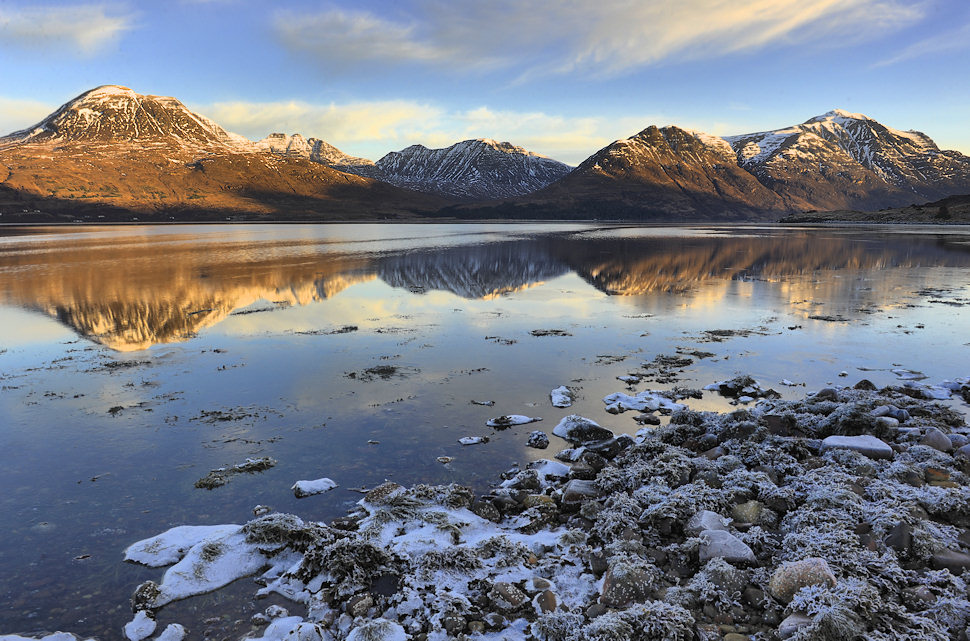
I often manually digital blend when I know the forground is going to be too dark (rather than HDR, which can too easily look fake). The forground in this shot is 2 stops from the rest of the composition, then cut and pasted on. This is how it looked to my eyes, but the camera was never going to cope.I had a bit of a play with my camera at the PH Sunday Service yesterday and tried to expose for a shot of the (bright) sunlight breaking through the clouds and streaming down, past the silhoette of the MINI building and onto the relatively dark car park. It was one of those naturally artistic moments that required zero creative input - if I could have captured it on camera the way anyone standing in that position could see it, it would have looked great. Instead I could either expose for the bright sunlight or the dull car park and buildings, I could never get both. It was frustrating as the dynmaic range wasn't that big - I wasn't after a hyper-real HDR effect or anything, I just didn't seem to be able to find a middle ground.
Chris71 said:
Instead I could either expose for the bright sunlight or the dull car park and buildings, I could never get both. It was frustrating as the dynmaic range wasn't that big - I wasn't after a hyper-real HDR effect or anything, I just didn't seem to be able to find a middle ground.
There's a limit to how far you can go with one RAW image; I think for that extreme situation you'd have to use a tripod and take two significantly different exposures. The trouble then is that when you blend them they can look fake because they're too far apart. Sometimes you just size up a situtation and say 'no'.Chris71 said:
Another question - how much more space does RAW require compared to JPEG for a similar image?
I shoot compressed RAW (to my eyes it works as well as uncompressed) and looking at my last shoot, they vary (from a 10Mp sensor) between 7.6Mb and 10.2Mb. When processed to same size quality 12 JPGs they ranged from 4.2Mb to 7.8Mb. The more detail/texture in the image, the larger the file.Edited by Simpo Two on Monday 31st January 12:01
Chris71 said:
Simpo Two said:
Each photographer will do what suits him best. Practical usage for me means adjusting WB so skin tones look right, poking levels and curves until the image looks the best it can, and for high-contrast images, processing the same image twice (for highlights and shadows) then compositing them manually in Photoshop to fake extended dynamic range.
I was wondering about this.I had a bit of a play with my camera at the PH Sunday Service yesterday and tried to expose for a shot of the (bright) sunlight breaking through the clouds and streaming down, past the silhoette of the MINI building and onto the relatively dark car park. It was one of those naturally artistic moments that required zero creative input - if I could have captured it on camera the way anyone standing in that position could see it, it would have looked great. Instead I could either expose for the bright sunlight or the dull car park and buildings, I could never get both. It was frustrating as the dynmaic range wasn't that big - I wasn't after a hyper-real HDR effect or anything, I just didn't seem to be able to find a middle ground.
Another question - how much more space does RAW require compared to JPEG for a similar image?
For your final question - lots more. And therein lies the reason why it's so much better than JPEG.
Addendum: A RAW file has a dynamic range of around 7-10 stops (depending on the camera). The brightest stop that the camera can register holds half of all the lightness values that a given pixel can represent, so it's to your advantage to expose for the brightest image you can get without blowing the highlights and then pull the exposure back in post-processing. This way, the bright tones in the RAW file become mid tones in the image file, and contain much more detail than if you'd under-exposed and increased exposure in post (and more detail even than if you'd got the exposure 'right').
Major Bloodnok said:
expose for the dull bits. If the dynamic range isn't too great, then you can recover the highlights in post-processing. Don't expose for the highlights and try to recover the shadows - you'll get noisy shadow detail.
Major Bloodnok said:
it's to your advantage to expose for the brightest image you can get without blowing the highlights and then pull the exposure back in post-processing.
I'd suggest that it's frequently impossible to expose for the shadows without blowing the highlights. Apart from specular highlights or parts of the image I don't mind losing, I expose for the highlights.But this is where differences in sensors, software and personal preference start to come in so it's probably best to experiment, get some flying hours in and find your own way.
For a good explanation and introduction to RAW try this: http://www.luminous-landscape.com/tutorials/unders...
For a basic primer into using it practically, try this: http://www.luminous-landscape.com/tutorials/unders...
For a little more about exposure, try this: http://www.luminous-landscape.com/tutorials/expose...
(some of the cameras mentioned somewhat date the articles, but the principles haven't changed)
For a basic primer into using it practically, try this: http://www.luminous-landscape.com/tutorials/unders...
For a little more about exposure, try this: http://www.luminous-landscape.com/tutorials/expose...
(some of the cameras mentioned somewhat date the articles, but the principles haven't changed)
jimmy156 said:
Simpo Two said:
You also get to determine the levels, curves, saturation and focus yourself, individually for each photo if you wish,
Correct me if I'm wrong but you cant adjust focus in a RAW file can you? Unless i'm missing something!There is some experimental software that tries to do thai I think.
And the other way, take a hyperfocal or dof stacked shot and post process it to whatever dof you want. Fake lensblur isnt all that good IMO tho.
RAW is a bit of a pain but worth it.
My usualy process is:
Adjust WB if needed
Adjust exposure/black/white levels either in ACR or photoshop with levels
Add some saturation
Shapen to remove AA effects
Resize for web use
resharpen
Output as sRGB jpg.
I currently work on 8bit covnersions as my pc barfs with 16bit pics
And the other way, take a hyperfocal or dof stacked shot and post process it to whatever dof you want. Fake lensblur isnt all that good IMO tho.
RAW is a bit of a pain but worth it.
My usualy process is:
Adjust WB if needed
Adjust exposure/black/white levels either in ACR or photoshop with levels
Add some saturation
Shapen to remove AA effects
Resize for web use
resharpen
Output as sRGB jpg.
I currently work on 8bit covnersions as my pc barfs with 16bit pics
RobDickinson said:
I currently work on 8bit covnersions as my pc barfs with 16bit pics
That's really funny to read after what you posted on that mac v windows thread....RobDickinson said:
One of the main apps I use is photoshop, Apples vesion has improved with the CS5 release gaining 64bit but even then it trails windows by quite some margin even on the same hardware. Ofcourse you wouldnt notice sat in front of a mac watching the spinning disk of boredom because 'it just works'.
FYI, 16 bit works just fine my lowest spec mac, an off the shelf, 18 month old MBP with a lowly 2.53 intel core duo chip and 4mb of RAM and CS3. Furthermore, a friend who converted to mac was doing some heavy duty multi layered editing on a mac pro and hadn't realised that Lightroom 2, by default, spat out 16bit tiffs. There was no complaints about performance, but they did wonder why the file size got up 2gb!
Maybe they just work after all?
 .
.Bacardi said:
FYI, 16 bit works just fine my lowest spec mac, an off the shelf, 18 month old MBP with a lowly 2.53 intel core duo chip and 4mb of RAM and CS3.
Its not that I cant, its that most of the time the output is 8bit jpg anyhow so whats the point.My PC is 3+ years old and has only 2 gig of memory, also depends a lot on how large the pics your working with and what layers doesnt it? It does tend to chug a bit when you run out of memory, as any machine will.. Also what else you have running.
Which is why I'm looking to upgrade my PC to something a little more modern.. I dont think I was the one arguing old hardware always works....
Isnt apples catchfrase it just works isnt it? Well my mates new iMac with 1gb of memory it certainly didnt...
You seem to be a bit defensive of your chosen OS by screwing up peoples threads like this one??
Edited by RobDickinson on Tuesday 1st February 01:38
Edited by RobDickinson on Tuesday 1st February 01:40


Gassing Station | Photography & Video | Top of Page | What's New | My Stuff