
Secure Boot certs expire in June
Discussion


This one still doesn't seem to be getting a lot of notice - the original 2011 set of Secure Boot bios certificates on PCs start expiring in June, which will start causing (hopefully minor) issues for anyone with an older PC who hasn't upgraded to the newer 2023 set which are then good to 2053.
The process has turned out to be slightly complicated by varying amounts of bios/uefi functionality and OEM updates often being thin on the ground.
Now I've been aware of this for a while but keep forgetting about it, and there's sure to be some bit of kit that'll have issues.
Would have forgotten about it except I was looking at something on my laptop today, needed to look at the logs, and saw logged TPM messages about how it had the updates but they weren't applied. For some reason I'd assumed it had just done it but no. And not the simplest process once you find it - set a registry key, then run a scheduled task (if enabled), look at event logs to see what happened, reboot a couple of times. All went smoothly in the end but despite all sorts of scripts & other stuff having been installed by updates the whole thing is basically invisible *even if you're aware of it* and needed manual intervention, with the instructions not the easiest to find; got further asking AI than I did with the official instructions.
The update process does have the possibility to royally f k your PC if it goes wrong depend on what your machine is like, especially if you have encryption/Bitlocker turned on when updating.
The whole situation is so incredibly low key, deliberately so, it could almost have a Beware of the Leopard sign - guess built in breaking obsolescence isn't something anyone wants to talk about.
Anyway the date is looming and you might be oblivious to a lurking unapplied fix on your PC. I know I was, and I've know about the general issue for ages.
The process has turned out to be slightly complicated by varying amounts of bios/uefi functionality and OEM updates often being thin on the ground.
Now I've been aware of this for a while but keep forgetting about it, and there's sure to be some bit of kit that'll have issues.
Would have forgotten about it except I was looking at something on my laptop today, needed to look at the logs, and saw logged TPM messages about how it had the updates but they weren't applied. For some reason I'd assumed it had just done it but no. And not the simplest process once you find it - set a registry key, then run a scheduled task (if enabled), look at event logs to see what happened, reboot a couple of times. All went smoothly in the end but despite all sorts of scripts & other stuff having been installed by updates the whole thing is basically invisible *even if you're aware of it* and needed manual intervention, with the instructions not the easiest to find; got further asking AI than I did with the official instructions.
The update process does have the possibility to royally f
k your PC if it goes wrong depend on what your machine is like, especially if you have encryption/Bitlocker turned on when updating. The whole situation is so incredibly low key, deliberately so, it could almost have a Beware of the Leopard sign - guess built in breaking obsolescence isn't something anyone wants to talk about.
Anyway the date is looming and you might be oblivious to a lurking unapplied fix on your PC. I know I was, and I've know about the general issue for ages.
I've been working on this for some time but recently - I've found this article useful in explaining the problem and how to use Intune + Remediation & Detection scripts can be utilised to get the process tested and fixed, using detalied outputs to help guide me where needed.
https://blog.mindcore.dk/2026/04/secure-boot-certi...
The key things to ensure are:
1. SecureBoot needs to be enabled in the BIOS and Windows needs to be able to recognise this (even if it is turned on in the BIOS)
2. BIOS must be up to date
3. All Cumulative Updates must be applied to Windows (so supporting files/applications are installed within the OS such as System32/WinFlagsCS.exe.
If the SecureBootCerts registry keys are applied but all above stages are done, then you may find you need to reinstall Windows on top of itself again (I've recently just realised on this on a few affected computers I support)
https://blog.mindcore.dk/2026/04/secure-boot-certi...
The key things to ensure are:
1. SecureBoot needs to be enabled in the BIOS and Windows needs to be able to recognise this (even if it is turned on in the BIOS)
2. BIOS must be up to date
3. All Cumulative Updates must be applied to Windows (so supporting files/applications are installed within the OS such as System32/WinFlagsCS.exe.
If the SecureBootCerts registry keys are applied but all above stages are done, then you may find you need to reinstall Windows on top of itself again (I've recently just realised on this on a few affected computers I support)
Thing is >90% of people are going to be oblivious and even competent people aren't going to know, and even fewer will pick up how to fix it.
For something that hits so many home users it's been utterly mishandled and weirdly under reported. And the technical process is opaque and fragile. Almost like everyone has just hoped it will go away if they ignore it.
I found it wasn't exactly straightforward for me to find or apply and I like to think I'm competent with most of this stuff, the non techies have no chance.
For something that hits so many home users it's been utterly mishandled and weirdly under reported. And the technical process is opaque and fragile. Almost like everyone has just hoped it will go away if they ignore it.
I found it wasn't exactly straightforward for me to find or apply and I like to think I'm competent with most of this stuff, the non techies have no chance.
S6PNJ said:
How would the 'average punter' know if they might be affected - what do I need to check / do on my home PC / laptops etc?
Start off by checking if Secure Boot is enabled:Windows+R>msinfo32>System Summary>Secure Boot State - half way down on the RH pane. If it's on you are affected, if it's off you probably aren't.
Mr Pointy said:
S6PNJ said:
How would the 'average punter' know if they might be affected - what do I need to check / do on my home PC / laptops etc?
Start off by checking if Secure Boot is enabled:Windows+R>msinfo32>System Summary>Secure Boot State - half way down on the RH pane. If it's on you are affected, if it's off you probably aren't.
Easy stuff...
Any newer PC should hopefully be fine already, but anything 2023 or older definitely needs checking. Not sure when it really got rolled out, even fairly new stuff can need sorting.
JoshSm said:
Mr Pointy said:
S6PNJ said:
How would the 'average punter' know if they might be affected - what do I need to check / do on my home PC / laptops etc?
Start off by checking if Secure Boot is enabled:Windows+R>msinfo32>System Summary>Secure Boot State - half way down on the RH pane. If it's on you are affected, if it's off you probably aren't.
Easy stuff...
Any newer PC should hopefully be fine already, but anything 2023 or older definitely needs checking. Not sure when it really got rolled out, even fairly new stuff can need sorting.
Run Device Security to see if Secure Boot is enabled.
My work PC tells me its on and there is an issue...
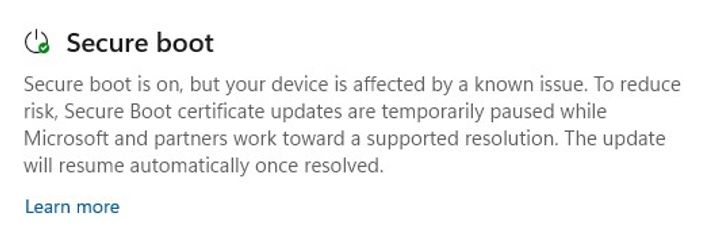
Clicking on "Learn more" takes me to here where it tells me...
"Most Windows devices will receive the updated certificates automatically, and many OEMs provide firmware updates when needed."
So basically, keep your device up to date and you'll probably be OK
My work PC tells me its on and there is an issue...
Clicking on "Learn more" takes me to here where it tells me...
"Most Windows devices will receive the updated certificates automatically, and many OEMs provide firmware updates when needed."
So basically, keep your device up to date and you'll probably be OK
Mr.Grimsdale said:
Run Device Security to see if Secure Boot is enabled.
My work PC tells me its on and there is an issue...
Clicking on "Learn more" takes me to here where it tells me...
"Most Windows devices will receive the updated certificates automatically, and many OEMs provide firmware updates when needed."
So basically, keep your device up to date and you'll probably be OK
That's what mine had, at least under the surface, never looked for a display like that. And of course I'd assumed the updates would have sorted it when it had only done the prep.My work PC tells me its on and there is an issue...
Clicking on "Learn more" takes me to here where it tells me...
"Most Windows devices will receive the updated certificates automatically, and many OEMs provide firmware updates when needed."
So basically, keep your device up to date and you'll probably be OK
In reality it'll probably sit like that forever as a firmware update will never come and Microsoft don't have the data to know it'll work when attempted so it stays sat in the pile of 'not definitely won't work, but not known to work, so lets wait'.
Hence poking the registry and running the task manually (like is needed for a corporate rollout) to get it to try and (hopefully) succeed.
For a lot of people the process will be stuck, quietly complaining in the background waiting for an intervention that will never come...
I was trying on an HP machine so not exactly something rare...
Mr Pointy said:
Start off by checking if Secure Boot is enabled:
Windows+R>msinfo32>System Summary>Secure Boot State - half way down on the RH pane. If it's on you are affected, if it's off you probably aren't.
Yup, my secure boot is enabled so I'm affected (on this laptop - others still to check)Windows+R>msinfo32>System Summary>Secure Boot State - half way down on the RH pane. If it's on you are affected, if it's off you probably aren't.
JoshSm said:
...run C:\Windows\SecureBoot\ExampleRolloutScripts\Detect-SecureBootCertUpdateStatus.ps1 in an Admin Powershell or Powershell ISE and look for green in the Certificate Update Summary at the end.
I had to enable scripts to run, but after this, yes, I have geen in the summary at the end, in that all of the 'updated' words are green.PowerShell said:
Certificate Update Summary
[1P] Windows UEFI CA 2023 (db): Updated
[1P] Microsoft Corporation KEK 2K CA 2023 (KEK): Updated
[3P] Microsoft Corporation UEFI CA 2011 (db): Present - 3P 2023 certs required
[3P] Microsoft UEFI CA 2023 (db): Updated
[3P] Microsoft Option ROM UEFI CA 2023 (db): Updated
=============================
Gassing Station | Computers, Gadgets & Stuff | Top of Page | What's New | My Stuff