
ST GTS Octopus IG refusing to work
Discussion


Morning folks,
I've been here before but refuse to give up. For the last two years I've been using the timer in the car to charge during the Octopus off peak hours. That threw a hissy fit a few days ago so I though I'd have another bash at setting up via the OIG App. Went through the various stages and all seemed to be set up perfectly. I've made sure the Zappi settings are correct as per the pics below but it still refuses to work telling me the charging lead is not connected, which of course it is.
Any ideas please?
Nick
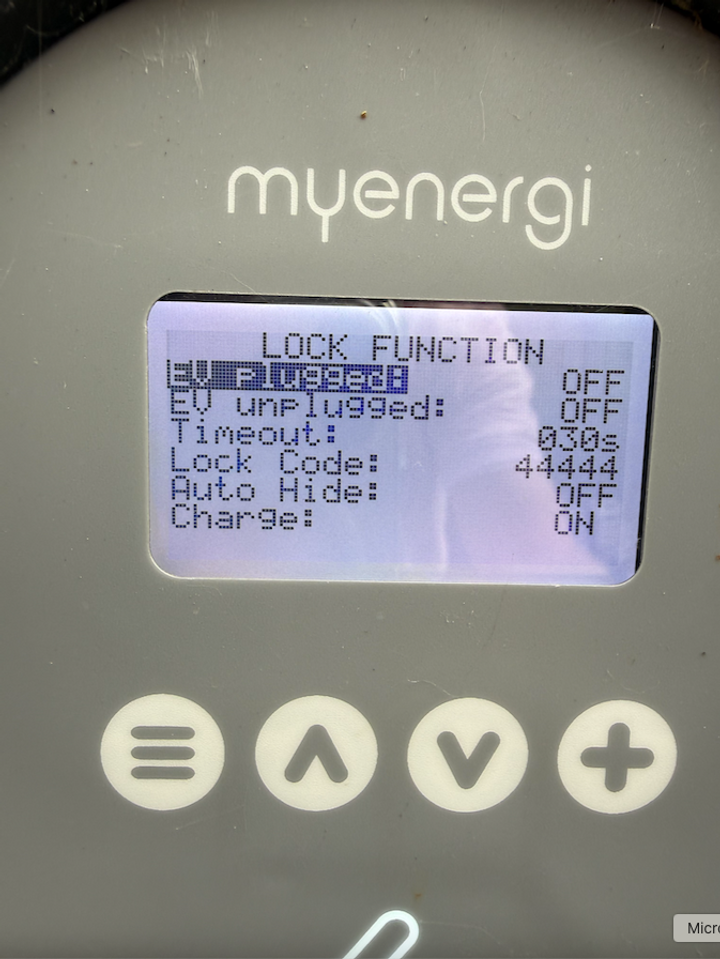
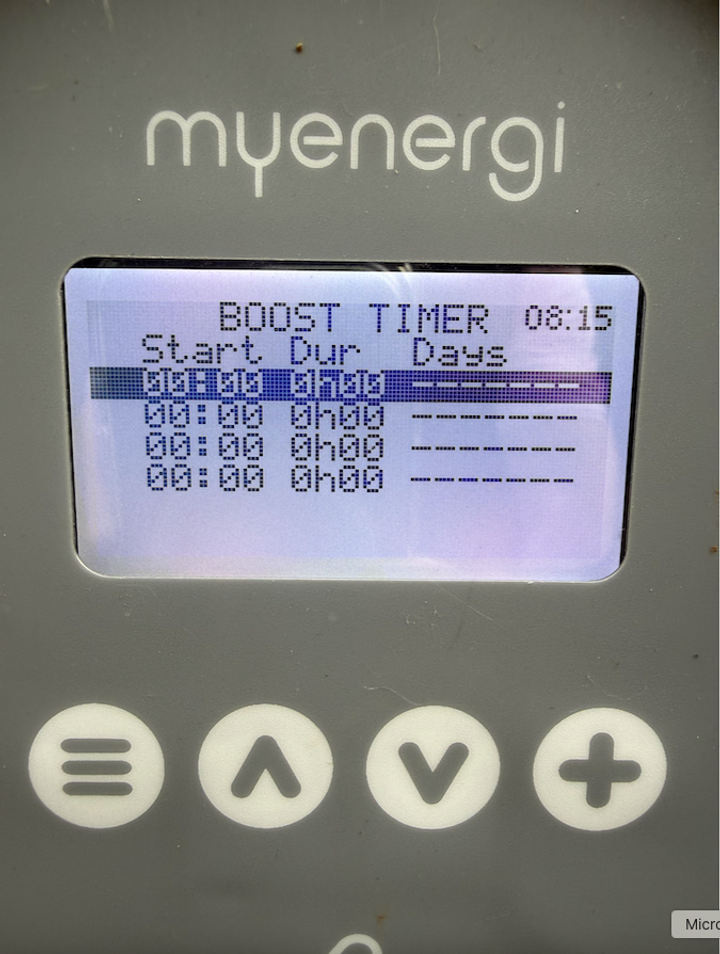
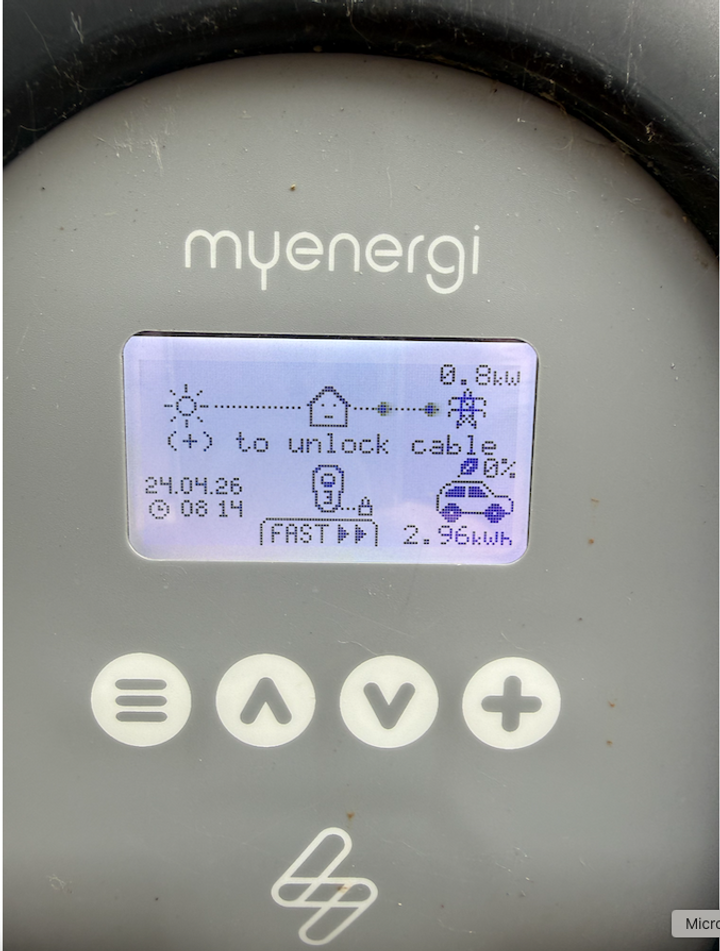
I've been here before but refuse to give up. For the last two years I've been using the timer in the car to charge during the Octopus off peak hours. That threw a hissy fit a few days ago so I though I'd have another bash at setting up via the OIG App. Went through the various stages and all seemed to be set up perfectly. I've made sure the Zappi settings are correct as per the pics below but it still refuses to work telling me the charging lead is not connected, which of course it is.
Any ideas please?
Nick
With mine I just deactivated any timers in the car/app. Followed the sign in process for OIG giving them my Porsche account details and it just worked from there after a few hours. I have a dumb charger though but I can't see that making a difference if you only give OIG the Porsche account details.
I've deactivated the OIG smart charging twice now though and removed by car from my Octopus account as after months of working perfectly it suddenly started charging the car to 100% which I really didn't want.
I've deactivated the OIG smart charging twice now though and removed by car from my Octopus account as after months of working perfectly it suddenly started charging the car to 100% which I really didn't want.
Octopus have recently changed how it works as my Leaf and tesla stopped working.
I have now turned off all management by the charger or the car and then connected to the app and it speaks directly to the Tesla.
But it wont speak to the leaf so now I have to set that in the car to just charge in the cheap hours and when plugged in the app does nothing.
I have now turned off all management by the charger or the car and then connected to the app and it speaks directly to the Tesla.
But it wont speak to the leaf so now I have to set that in the car to just charge in the cheap hours and when plugged in the app does nothing.
Timely thread. Octopus Intelligent Go and Hypervolt Pro 3-so many modes and features that can stop the charging and or limit it.
Things that foiled me for days:
Having the car app setting 'departure time' which incidentally I never set but was present-charged for an hour then stopped.
The wall box app was set to 'plug and charge' not 'scheduled' so didn't charge despite the schedule being set.
And you still have to contend with the energy supplier choosing(throttling) the amount of juice it gives you
Octopuss App connected to the BMW first go. It won't connect to the Macan (read common issue)-so managing everything from the Hypervolt App
Try loading the images into Grok/GPT.
Things that foiled me for days:
Having the car app setting 'departure time' which incidentally I never set but was present-charged for an hour then stopped.
The wall box app was set to 'plug and charge' not 'scheduled' so didn't charge despite the schedule being set.
And you still have to contend with the energy supplier choosing(throttling) the amount of juice it gives you
Octopuss App connected to the BMW first go. It won't connect to the Macan (read common issue)-so managing everything from the Hypervolt App
Try loading the images into Grok/GPT.
Thanks for the replies, folks.
I'm begining to think it's the car, don't forget this was the reason I attempted the OIG route. Having deleted all Apps to ensure no conflicts (Octopus/Zappi) and deleting and recreating the timer in the car it still will not charge in the alloted timeframe.
I've rebooted the PCM so will see if it works tonight.
I'm begining to think it's the car, don't forget this was the reason I attempted the OIG route. Having deleted all Apps to ensure no conflicts (Octopus/Zappi) and deleting and recreating the timer in the car it still will not charge in the alloted timeframe.
I've rebooted the PCM so will see if it works tonight.
Can Octopus talk directly to the Zappi? If so, that's much more reliable than having them control the car, due to the funny way Porsche's charging profiles work and how Octopus have to manipulate them to manage the charge times.
If you go through the new device setup in the Octopus app, then select a car that they can't control directly (eg a Fisker), it will let you connect the charger instead.
Octopus control my Hypervolt 3, my Taycan has a very basic charge profile to limit it to 80% or whatever I choose, and I have no problems.
If you go through the new device setup in the Octopus app, then select a car that they can't control directly (eg a Fisker), it will let you connect the charger instead.
Octopus control my Hypervolt 3, my Taycan has a very basic charge profile to limit it to 80% or whatever I choose, and I have no problems.
tomtom said:
Can Octopus talk directly to the Zappi? If so, that's much more reliable than having them control the car, due to the funny way Porsche's charging profiles work and how Octopus have to manipulate them to manage the charge times.
If you go through the new device setup in the Octopus app, then select a car that they can't control directly (eg a Fisker), it will let you connect the charger instead.
Octopus control my Hypervolt 3, my Taycan has a very basic charge profile to limit it to 80% or whatever I choose, and I have no problems.
Thank you. I will give that a go.If you go through the new device setup in the Octopus app, then select a car that they can't control directly (eg a Fisker), it will let you connect the charger instead.
Octopus control my Hypervolt 3, my Taycan has a very basic charge profile to limit it to 80% or whatever I choose, and I have no problems.
What should I set the "Charge to add" % at please?
Try to find a something that has a battery of a similar size to your car. I've got mine set up as a Fisker Ocean which I think has a 110kWh battery vs my 93kWh, so I have to subtract a bit to figure out what % to request to get it close to what I want.
It's doesn't seem to be crucial for you to be spot on. I'll often request say 15% (of 110kWh), when I actually want 15% (of 93kWh...), and it'll just stop charging 'early' when the car hits the target defined in your charging profile. This doesn't seem to cause any problems.
It's doesn't seem to be crucial for you to be spot on. I'll often request say 15% (of 110kWh), when I actually want 15% (of 93kWh...), and it'll just stop charging 'early' when the car hits the target defined in your charging profile. This doesn't seem to cause any problems.
tomtom said:
Try to find a something that has a battery of a similar size to your car. I've got mine set up as a Fisker Ocean which I think has a 110kWh battery vs my 93kWh, so I have to subtract a bit to figure out what % to request to get it close to what I want.
It's doesn't seem to be crucial for you to be spot on. I'll often request say 15% (of 110kWh), when I actually want 15% (of 93kWh...), and it'll just stop charging 'early' when the car hits the target defined in your charging profile. This doesn't seem to cause any problems.
Sorry to be thick. is the "Charge to add" only for when you use Boost Charge?It's doesn't seem to be crucial for you to be spot on. I'll often request say 15% (of 110kWh), when I actually want 15% (of 93kWh...), and it'll just stop charging 'early' when the car hits the target defined in your charging profile. This doesn't seem to cause any problems.
Here's how it works with my setup:
1. The car will stop accepting electricity when it reaches 80%
2. The charger will stop sending electricity to the car when the Octopus-provided schedule ends
Usually '1' happens first due to the slight mismatch between the battery they think I have, and the battery I actually have.
Does that make sense? I'm not sure how it 'looks' with the Zappi but the theory should be the same, if Octopus can control it.
edit: to answer your question about boost charge directly, my understanding is that if you press that, it'll start charging immediately and this will charge you the full 'peak' rate if you're boost charging outside the cheap 2330-0530 periods. If Octopus manages the charging schedule, it will always charge you the cheap rate when they decide to charge the car, even if that's outside the cheap 2330-0530 period.
(They have said this may change soon to cap the off peak periods to a max of 6hrs a day regardless of times)
- Octopus controls the charger
- I have a single charge profile in the car, set to a max of 80%
- I get home with the battery at 60%
- In the Octopus app, I set 'charge to add' to 20%. I do not press 'boost' charge (unless I want it to start charging immediately cos I'm in a rush)
- I plug in the car
- Octopus detect the car is plugged in, and that I want 20%. They figure out how they want to deliver the electricity and send a charging schedule to my charger. Usually this will be scheduled in the cheap 2330-0530 window.
- The charger sends power to the car according to the schedule Octopus have created
1. The car will stop accepting electricity when it reaches 80%
2. The charger will stop sending electricity to the car when the Octopus-provided schedule ends
Usually '1' happens first due to the slight mismatch between the battery they think I have, and the battery I actually have.
Does that make sense? I'm not sure how it 'looks' with the Zappi but the theory should be the same, if Octopus can control it.
edit: to answer your question about boost charge directly, my understanding is that if you press that, it'll start charging immediately and this will charge you the full 'peak' rate if you're boost charging outside the cheap 2330-0530 periods. If Octopus manages the charging schedule, it will always charge you the cheap rate when they decide to charge the car, even if that's outside the cheap 2330-0530 period.
(They have said this may change soon to cap the off peak periods to a max of 6hrs a day regardless of times)
Edited by tomtom on Tuesday 28th April 14:18
tomtom said:
Here's how it works with my setup:
1. The car will stop accepting electricity when it reaches 80%
2. The charger will stop sending electricity to the car when the Octopus-provided schedule ends
Usually '1' happens first due to the slight mismatch between the battery they think I have, and the battery I actually have.
Does that make sense? I'm not sure how it 'looks' with the Zappi but the theory should be the same, if Octopus can control it.
edit: to answer your question about boost charge directly, my understanding is that if you press that, it'll start charging immediately and this will charge you the full 'peak' rate if you're boost charging outside the cheap 2330-0530 periods. If Octopus manages the charging schedule, it will always charge you the cheap rate when they decide to charge the car, even if that's outside the cheap 2330-0530 period.
(They have said this may change soon to cap the off peak periods to a max of 6hrs a day regardless of times)
Thank you.- Octopus controls the charger
- I have a single charge profile in the car, set to a max of 80%
- I get home with the battery at 60%
- In the Octopus app, I set 'charge to add' to 20%. I do not press 'boost' charge (unless I want it to start charging immediately cos I'm in a rush)
- I plug in the car
- Octopus detect the car is plugged in, and that I want 20%. They figure out how they want to deliver the electricity and send a charging schedule to my charger. Usually this will be scheduled in the cheap 2330-0530 window.
- The charger sends power to the car according to the schedule Octopus have created
1. The car will stop accepting electricity when it reaches 80%
2. The charger will stop sending electricity to the car when the Octopus-provided schedule ends
Usually '1' happens first due to the slight mismatch between the battery they think I have, and the battery I actually have.
Does that make sense? I'm not sure how it 'looks' with the Zappi but the theory should be the same, if Octopus can control it.
edit: to answer your question about boost charge directly, my understanding is that if you press that, it'll start charging immediately and this will charge you the full 'peak' rate if you're boost charging outside the cheap 2330-0530 periods. If Octopus manages the charging schedule, it will always charge you the cheap rate when they decide to charge the car, even if that's outside the cheap 2330-0530 period.
(They have said this may change soon to cap the off peak periods to a max of 6hrs a day regardless of times)
Edited by tomtom on Tuesday 28th April 14:18
Makes perfect sense although I wasn't expecting to set the charge to add every day.
You can just set / change it when you need to charge. Or just leave it set to a high % in the Octopus app so that if you're plugging the car in every night it'll always just request an 80% charge or whatever.
Octopus only re-evaluate the scheduling and your requested charge when the car is plugged in again. So if you plug it in tonight, and it charges overnight, it's not going to do anything again until you unplug and replug.
Just setting / changing the 'charge to add' again isn't enough to trigger another charge if the car remains plugged in. That caught me out once at first.
Octopus only re-evaluate the scheduling and your requested charge when the car is plugged in again. So if you plug it in tonight, and it charges overnight, it's not going to do anything again until you unplug and replug.
Just setting / changing the 'charge to add' again isn't enough to trigger another charge if the car remains plugged in. That caught me out once at first.
Edited by tomtom on Tuesday 28th April 14:58
tomtom said:
You can just set / change it when you need to charge. Or just leave it set to a high % in the Octopus app so that if you're plugging the car in every night it'll always just request an 80% charge or whatever.
Octopus only re-evaluate the scheduling and your requested charge when the car is plugged in again. So if you plug it in tonight, and it charges overnight, it's not going to do anything again until you unplug and replug.
Just setting / changing the 'charge to add' again isn't enough to trigger another charge if the car remains plugged in. That caught me out once at first.
Thanks again. Fingers crossedOctopus only re-evaluate the scheduling and your requested charge when the car is plugged in again. So if you plug it in tonight, and it charges overnight, it's not going to do anything again until you unplug and replug.
Just setting / changing the 'charge to add' again isn't enough to trigger another charge if the car remains plugged in. That caught me out once at first.
Edited by tomtom on Tuesday 28th April 14:58
I don't know how your Zappi app looks, but in my Hypervolt app I can see the charging windows Octopus have created each time I plug in the car, so I can ensure everything is talking to everything else correctly.
edit: this thread: https://www.taycanforum.com/forum/threads/intellig... suggests you should be able to see the charging windows in the Zappi app
edit: this thread: https://www.taycanforum.com/forum/threads/intellig... suggests you should be able to see the charging windows in the Zappi app
Edited by tomtom on Tuesday 28th April 15:09
Tomtom,
Your help thus far is hugely appreciated. Still waiting to hear from my local OPC as to why the onboard system has stopped working.
So last night OIG set a schedule that I could watch real time. Charging due to start at 20:30. At that time the timer in the car was still on as that controls maximum charge and preheat in the morning.
20:30 comes along and Zappi App reports EV will not allow charge. As soon as I turned of the car timer charging began. Woke up this morning and car has charged to 100% which is obviously not what I want and has not pre heated.
I have no idea how I can limit to 85% and preheat without using the timer which screws up the OIG config.
Hopefully OPC will have an answer soon.
Nick
Your help thus far is hugely appreciated. Still waiting to hear from my local OPC as to why the onboard system has stopped working.
So last night OIG set a schedule that I could watch real time. Charging due to start at 20:30. At that time the timer in the car was still on as that controls maximum charge and preheat in the morning.
20:30 comes along and Zappi App reports EV will not allow charge. As soon as I turned of the car timer charging began. Woke up this morning and car has charged to 100% which is obviously not what I want and has not pre heated.
I have no idea how I can limit to 85% and preheat without using the timer which screws up the OIG config.
Hopefully OPC will have an answer soon.
Nick
Ah. Yes I don t have any timers configured on the car. Only a single, very simple charge profile with the % set to 80% and ‘Optimised charging’ set instead of timed charging.
I suspect the timer conflicts with the dynamic scheduling; if the car won t accept charge when Octopus try to charge it, I think they won t try again until you unplug and plug in again.
I suspect the timer conflicts with the dynamic scheduling; if the car won t accept charge when Octopus try to charge it, I think they won t try again until you unplug and plug in again.
Edited by tomtom on Thursday 30th April 23:09
tomtom said:
Ah. Yes I don t have any timers configured on the car. Only a single, very simple charge profile with the % set to 80% and Optimised charging set instead of timed charging.
I suspect the timer conflicts with the dynamic scheduling; if the car won t accept charge when Octopus try to charge it, I think they won t try again until you unplug and plug in again.
I can't see where to set the max charge in the profile option.I suspect the timer conflicts with the dynamic scheduling; if the car won t accept charge when Octopus try to charge it, I think they won t try again until you unplug and plug in again.
Ive learned a lot in the past week or so.
The Octopus App offers up other slots during the day (on the cheap rate), if using Intelligent-Go. So you plug in and the wallbox starts giving it a bit of juice and OP stop it if it's not cheap electricity. So it seemed counter intuitive to set the wallbox to 'Plug in and charge' but that is what you do. Let OP set the charge slots unless you need to charge 'now' and you hit Boost which overrides everything.
I'm not sure if during those extra slots which are outside the normal 13.30-05.30 also offers cheap electricity to the main house. Theoretically OP can tell what the car is taking and the total draw so could work split the rate between house/car.
The Octopus App offers up other slots during the day (on the cheap rate), if using Intelligent-Go. So you plug in and the wallbox starts giving it a bit of juice and OP stop it if it's not cheap electricity. So it seemed counter intuitive to set the wallbox to 'Plug in and charge' but that is what you do. Let OP set the charge slots unless you need to charge 'now' and you hit Boost which overrides everything.
I'm not sure if during those extra slots which are outside the normal 13.30-05.30 also offers cheap electricity to the main house. Theoretically OP can tell what the car is taking and the total draw so could work split the rate between house/car.
Gassing Station | Porsche EVs | Top of Page | What's New | My Stuff