
Compressing/zipping MP4 files - how please?
Discussion


MP4 files are already heavily compressed, although it depends on which codec is within the MP4 wrapper.
Your best option might be to re-render to a lower resolution or using, H.265 rather then H.264 as the codec.
Try downloading Handbrake and seeing what's what.
Be warned, though - re-rendering video takes a very long time unless you have a very powerful machine.
Your best option might be to re-render to a lower resolution or using, H.265 rather then H.264 as the codec.
Try downloading Handbrake and seeing what's what.
Be warned, though - re-rendering video takes a very long time unless you have a very powerful machine.
Handbrake is the best idea, just load up your video, choose an appropriate profile, go to the video tab and set the RF slider to a higher number, the higher it is the more it will compress the video but the lower the quality will be. But you should find you can compress it quite a lot before you notice.
What resolution/length/fps are the videos?
If they're 4K and 1hr long then you may have some very large files...but you should be able to trim/scale/transcode them to something smaller...for example I've got some 4k footage at 24 FPS in H264 (HVEC MAIN 10) and it's about 1.5GB per hour or 800MB per hour at 1080p.
If they're 4K and 1hr long then you may have some very large files...but you should be able to trim/scale/transcode them to something smaller...for example I've got some 4k footage at 24 FPS in H264 (HVEC MAIN 10) and it's about 1.5GB per hour or 800MB per hour at 1080p.
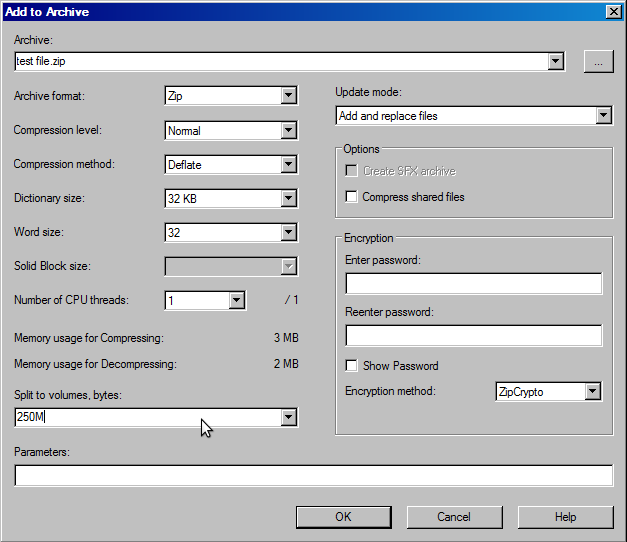

I don't know 7zip but if it can just create ZIP files with each containing a chunk of the original, the receiver can use normal Windows zip to depack them, then in command prompt run "copy /b file1 + file2 + file3 output.mp4" to recombine it. Depends on how technical and keen they are, I'd try to downscale it first with handbrake/ffmpeg/etc.
Riley Blue said:
The limit per file is 1GB, some of those I need to send are 6GB. They can't accept them on a memory stick so if I'm unable make your suggestions work I'll take in my laptop and show them on it.
Are these medical videos each an hour long? You may not be able to compress them further if so. If they are a minute each and 6GB then something is off, and they should be easily compressible with tools like Handbrake.But even if they were 1GB (and depending upon your fibre connection) they will take a long time to upload. Taking in a laptop and playing it for an hour might be easiest!
Riley Blue said:
I need to upload MP4 video files for medical reasons but there's a 1GB limit and some I need to send are much larger. Can I compress or zip them easily on my laptop or PC?
Try contacting the recipient. Assuming they are an organisation they will have dealt with this situation before and might have an upload portal. Gassing Station | Computers, Gadgets & Stuff | Top of Page | What's New | My Stuff