
Quick Lightroom (4) query
Discussion


Hmm.... 
You probably need to give them an attribute (which is probably best when you sort them, it's easy to delete them - whether from library or disk).
Personally, I give files I am going to work on a 2 or 3 *. Then simply ignore the rest which will all be archived anyway.
Possibly worth giving the ones you want to ditch a colour or something.
However, I suspect you mean can you now do this retrospectively? Don't think so. Again, unless you use an attribute or metadata already there......
You probably need to give them an attribute (which is probably best when you sort them, it's easy to delete them - whether from library or disk).
Personally, I give files I am going to work on a 2 or 3 *. Then simply ignore the rest which will all be archived anyway.
Possibly worth giving the ones you want to ditch a colour or something.
However, I suspect you mean can you now do this retrospectively? Don't think so. Again, unless you use an attribute or metadata already there......
Lightroom puts an icon on the thumbnails in the filmstrip if an image has been cropped or the colour edited, so it must be written into metadata somewhere, although if you applied an import preset to all images you may have a problem. You could also look along the lines of "Metadata time" and "Import time" I think they are the fields anyway.
Going forwards the way I sort this is to add either a tag or a colour to every image I process, depending on usage, then I have a collection set to group all images without a colour or star rating and over 12 months old, every so often I sort through these images and delete/process them to keep my catalog tidy.
Going forwards the way I sort this is to add either a tag or a colour to every image I process, depending on usage, then I have a collection set to group all images without a colour or star rating and over 12 months old, every so often I sort through these images and delete/process them to keep my catalog tidy.
Craikeybaby said:
Lightroom puts an icon on the thumbnails in the filmstrip if an image has been cropped or the colour edited, so it must be written into metadata somewhere, although if you applied an import preset to all images you may have a problem. You could also look along the lines of "Metadata time" and "Import time" I think they are the fields anyway.
Going forwards the way I sort this is to add either a tag or a colour to every image I process, depending on usage, then I have a collection set to group all images without a colour or star rating and over 12 months old, every so often I sort through these images and delete/process them to keep my catalog tidy.
It's this. Sortof. I can see those that have been edited - chances are that, over the years, if they've been edited, that's it and I'll leave the rest. It's this rest I want to filter on and delete.Going forwards the way I sort this is to add either a tag or a colour to every image I process, depending on usage, then I have a collection set to group all images without a colour or star rating and over 12 months old, every so often I sort through these images and delete/process them to keep my catalog tidy.
The alternative is to go through EVERY library (by month) and change to a colour and delete those...
Try creating a smart collection with the following filter. I think it will give you what you want. I called mine "test non edits", you can use what ever you like.
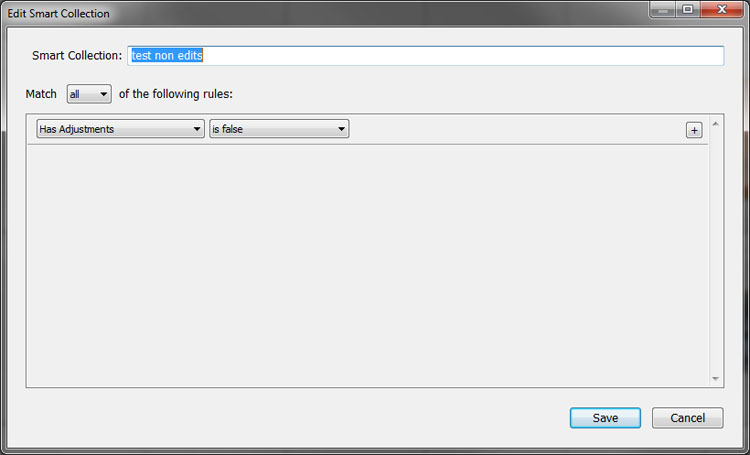
The filter selects un-adjusted images, it does however include those that have been tagged with key words. You can refine the search with further logical tests on the following extra criteria :
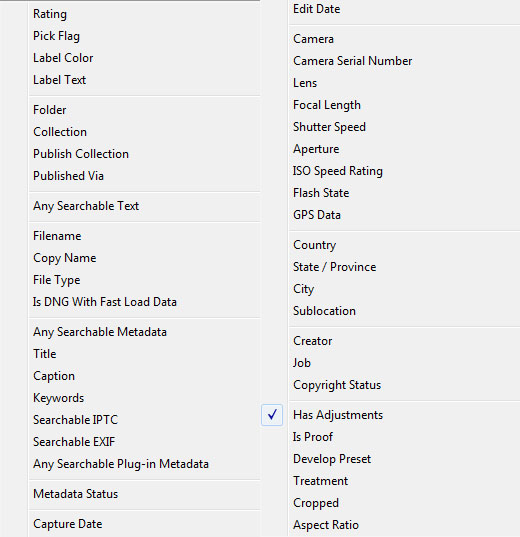
Seems to work for me.
Number31
The filter selects un-adjusted images, it does however include those that have been tagged with key words. You can refine the search with further logical tests on the following extra criteria :
Seems to work for me.
Number31
Number31 said:
Try creating a smart collection with the following filter. I think it will give you what you want. I called mine "test non edits", you can use what ever you like.
The filter selects un-adjusted images, it does however include those that have been tagged with key words. You can refine the search with further logical tests on the following extra criteria :
Seems to work for me.
Number31
Thanks - I'll try that The filter selects un-adjusted images, it does however include those that have been tagged with key words. You can refine the search with further logical tests on the following extra criteria :
Seems to work for me.
Number31


Number31 said:
Try creating a smart collection with the following filter. I think it will give you what you want. I called mine "test non edits", you can use what ever you like.
The filter selects un-adjusted images, it does however include those that have been tagged with key words. You can refine the search with further logical tests on the following extra criteria :
Seems to work for me.
Number31
Thanks for that Ive added it to my list!The filter selects un-adjusted images, it does however include those that have been tagged with key words. You can refine the search with further logical tests on the following extra criteria :
Seems to work for me.
Number31
Gassing Station | Photography & Video | Top of Page | What's New | My Stuff