
2x Timelapses (San Francisco & Yosemite)
Discussion


I uploaded a couple of timelapses taken on Wednesday (from the Marin Headlands - Golden Gate Bridge overlook) and Thursday (Glacier Point overlook in Yosemite) if you're into that sort of thing...
San Francisco Rolling Fog - http://flic.kr/p/apHjL9
Glacier Point - http://flic.kr/p/apEJjn
San Francisco Rolling Fog - http://flic.kr/p/apHjL9
Glacier Point - http://flic.kr/p/apEJjn
Dudd said:
Love them, with the Fog one, do you have to move the camera with each shot?
I love the way the trees flick in and out of the sun on the Yosemite vid!
No, I've what is essentially an egg timer which rotates round with the camera mounted on top I love the way the trees flick in and out of the sun on the Yosemite vid!

In process of sorting out over 2 hours worth of shots from this evening overlooking the Golden Gate Bridge, which was actually partially on show today too!
baz7175 said:
I uploaded a couple of timelapses taken on Wednesday (from the Marin Headlands - Golden Gate Bridge overlook) and Thursday (Glacier Point overlook in Yosemite) if you're into that sort of thing...
San Francisco Rolling Fog - http://flic.kr/p/apHjL9
Glacier Point - http://flic.kr/p/apEJjn
Love the one of Half Dome at Yosemite, it's on my "to climb" list San Francisco Rolling Fog - http://flic.kr/p/apHjL9
Glacier Point - http://flic.kr/p/apEJjn
Some nice vids Baz but in my opinion the glacier point one needs speeding up a bit.
One of the rules for timelapses seems to be that each individual sequence should be around 8-10 seconds or it gets a bit mudane.
Also, rather than using flickr, Vimeo is much better for uploading and watching videos. FlickR seems to do some odd compression and any of my vids never look as good on it as on Vimeo.
Would love to go to Yellow Stone . Was planning a trip last year but everything went pear shaped!
One of the rules for timelapses seems to be that each individual sequence should be around 8-10 seconds or it gets a bit mudane.
Also, rather than using flickr, Vimeo is much better for uploading and watching videos. FlickR seems to do some odd compression and any of my vids never look as good on it as on Vimeo.
Would love to go to Yellow Stone
. Was planning a trip last year but everything went pear shaped!baz7175 said:
No, I've what is essentially an egg timer which rotates round with the camera mounted on top
That's spooky we had the same idea - and glad to see it works - I had ordered a flat egg timer a few weeks back so I could sucker mount the video to it and let it rotate round. I had planned to play about with it when I get home in a week or so.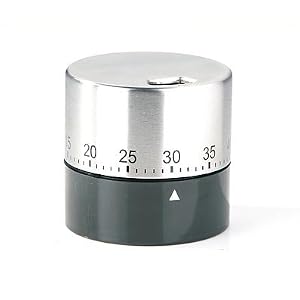
My thinking was - if I want to go clockwise, mount it on the top - if I want to go anti-clockwise mount it on the bottom.
I had previously hacked up an egg timer to make my own, but discovered there's a company that has produced a ready made version, and at $24.95 it's not that expensive and saves you having to do all the DIY hackeroo stuff...
http://camarush.com/camalapse-time-lapse-panning
The other thing to remember is that shooting such a vid/sequence of pics is that due to the nature of the rotation mechanism there is a little wobble possible, so wind will affect it a little...
http://camarush.com/camalapse-time-lapse-panning
The other thing to remember is that shooting such a vid/sequence of pics is that due to the nature of the rotation mechanism there is a little wobble possible, so wind will affect it a little...
14-7 said:
Some nice vids Baz but in my opinion the glacier point one needs speeding up a bit.
The clouds were so slow moving in real life around lunchtime, I still have another one from a different location around 2 hours later in which the movement is much faster (in real life), cheers for the input though baz7175 said:
I had previously hacked up an egg timer to make my own, but discovered there's a company that has produced a ready made version, and at $24.95 it's not that expensive and saves you having to do all the DIY hackeroo stuff...
http://camarush.com/camalapse-time-lapse-panning
The other thing to remember is that shooting such a vid/sequence of pics is that due to the nature of the rotation mechanism there is a little wobble possible, so wind will affect it a little...
What's this DIY hackeroo stuff you talk about http://camarush.com/camalapse-time-lapse-panning
The other thing to remember is that shooting such a vid/sequence of pics is that due to the nature of the rotation mechanism there is a little wobble possible, so wind will affect it a little...
I'm going to suckermount my little Contour onto it and see how it goes on my nine pound egg timer goes and if it doesn't work I'll use it for eggs. crmcatee said:
What's this DIY hackeroo stuff you talk about I'm going to suckermount my little Contour onto it and see how it goes on my nine pound egg timer goes and if it doesn't work I'll use it for eggs.
Easier than my original attempt, which involved pulling an eggtimer apart and adding threads to the top and bottom of it to mount the tripod/camera... I'm going to suckermount my little Contour onto it and see how it goes on my nine pound egg timer goes and if it doesn't work I'll use it for eggs. 
2x more vids just added:-
2nd one from Glacier - http://flic.kr/p/aq9R2y
Crater Lake today (from near the top of Garfield Peak, using the Camalapse) - http://flic.kr/p/aq9Gqj
Edited by baz7175 on Sunday 25th September 08:38
Liking the second one Baz. Good movement of the clouds in that one.
Do you have After Effects/Premier Pro by any chance. Two invaluable bits of software for timelapse stuff in my opinion although quite a lot of people use Sony software as well (can't remember the name).
If you are getting more in to timelapse stuff http://forum.timescapes.org/phpBB3/index.php is an invaluable source of information and knowledge.
Do you have After Effects/Premier Pro by any chance. Two invaluable bits of software for timelapse stuff in my opinion although quite a lot of people use Sony software as well (can't remember the name).
If you are getting more in to timelapse stuff http://forum.timescapes.org/phpBB3/index.php is an invaluable source of information and knowledge.
Gassing Station | Photography & Video | Top of Page | What's New | My Stuff