
wifi booster/extender what is best
Discussion


Just moved from Sky to Virgin
Had a sky 'extender' fitted to enable signal from bird boxes
The extender was sited next to a garden window which has direct line of sight to both boxes
The virgin router is sited at front of house with the 'extender' at rear of house,in effect across one room about 6m, across hall 2m then 4m to extender position in side shed so total distance between virgin router and extender location is about 12 metres max route
I still have the sky 'booster' which worked perfectly last year Will that work in conjunction with the virgin router?
Not interested in mesh or other fancy gubbins .just require the wifi equivalent of an extention lead to reach the kit in the bird box
There is power in the workshop that the nest boxes are attached to.. would another 'booster/extenderr' sited in the workshop be of any help? .....sort of wifi router to first extender in side shed to second extender in workshop where nest boxes sited?
Or are there any units out there that would bridge the gap between the side side and workshop about 15m
I trust that makes sense
Had a sky 'extender' fitted to enable signal from bird boxes
The extender was sited next to a garden window which has direct line of sight to both boxes
The virgin router is sited at front of house with the 'extender' at rear of house,in effect across one room about 6m, across hall 2m then 4m to extender position in side shed so total distance between virgin router and extender location is about 12 metres max route
I still have the sky 'booster' which worked perfectly last year Will that work in conjunction with the virgin router?
Not interested in mesh or other fancy gubbins .just require the wifi equivalent of an extention lead to reach the kit in the bird box
There is power in the workshop that the nest boxes are attached to.. would another 'booster/extenderr' sited in the workshop be of any help? .....sort of wifi router to first extender in side shed to second extender in workshop where nest boxes sited?
Or are there any units out there that would bridge the gap between the side side and workshop about 15m
I trust that makes sense
silverfoxcc said:
Not interested in mesh or other fancy gubbins .just require the wifi equivalent of an extention lead to reach the kit in the bird box
"Mesh" isn't about "fancy gubbins"...FWIW - I tried the extender route, bought a load of kit and got to the point where I was about to launch it out of the window. As soon as I installed a mesh, I was kicking myself for not installing sooner.
M
What you really need is a cable from the Virgin router to where you want WiFi, and plug a wireless access point in. Then the 2 devices are talking through fast cable rather than introducing another wifi link. Filling your house with more clashing WiFi signals usually does more harm than good.
Personally I have a TP-Link Omada system linked with cables but that would be overkill for you by the sounds of it.
Personally I have a TP-Link Omada system linked with cables but that would be overkill for you by the sounds of it.
If an extender worked for you before, another one will again. Whether the original one is unlocked or not, only you can find out. If it is locked to the provider then a TPlink wifi extender is small beans.
All they do is pick up wifi within range then rebroadcast it again. - You lose around 50% bandwidth but for a lot of cases people don't care / notice.
You actually ARE creating a mesh of sorts, just one with a shared backhaul.
All they do is pick up wifi within range then rebroadcast it again. - You lose around 50% bandwidth but for a lot of cases people don't care / notice.
You actually ARE creating a mesh of sorts, just one with a shared backhaul.
I went from BT to Virgin, if you use their app and upload the results they will send you a free booster, they call it a pod.
We had one fitted at install by the engineer, but found another black spot in use and they sent another.
Up to 3 are free if you have the WiFi max option, which in our case was just part of the 500Mb package, not an extra.
We had 3 BT discs to do the same job, these definitely were not compatible with the Virgin Router, I tried one whilst waiting on the extra.
We had one fitted at install by the engineer, but found another black spot in use and they sent another.
Up to 3 are free if you have the WiFi max option, which in our case was just part of the 500Mb package, not an extra.
We had 3 BT discs to do the same job, these definitely were not compatible with the Virgin Router, I tried one whilst waiting on the extra.
camel_landy said:
"Mesh" isn't about "fancy gubbins"...
FWIW - I tried the extender route, bought a load of kit and got to the point where I was about to launch it out of the window. As soon as I installed a mesh, I was kicking myself for not installing sooner.
M
Silverfoxxcc, camel_landy is spot-on. You can get a 3-set TP-link Deco set for £100 which will "just work". It really is near-magic and will save lots of faffing about with extenders. Which should have died off 20 years ago.FWIW - I tried the extender route, bought a load of kit and got to the point where I was about to launch it out of the window. As soon as I installed a mesh, I was kicking myself for not installing sooner.
M
biggiles said:
camel_landy said:
"Mesh" isn't about "fancy gubbins"...
FWIW - I tried the extender route, bought a load of kit and got to the point where I was about to launch it out of the window. As soon as I installed a mesh, I was kicking myself for not installing sooner.
M
Silverfoxxcc, camel_landy is spot-on. You can get a 3-set TP-link Deco set for £100 which will "just work". It really is near-magic and will save lots of faffing about with extenders. Which should have died off 20 years ago.FWIW - I tried the extender route, bought a load of kit and got to the point where I was about to launch it out of the window. As soon as I installed a mesh, I was kicking myself for not installing sooner.
M
No reason why they should "die off" when the OP has a use case that works with this £13 solution vs a £100 solution.
Mesh is great, when you need it, and its bandwidth, but its still £100, and it doesn't always "just work". Someone I know , this very weekend, needed half an hour hand holding from me on Whatsapp after he followed the Deco app instructions and ended up with two subnets - one for his BT router, and one for his Deco. He could no understand why the Decos would talk to each other only when connected to each other, and not the BT router..... (he'd elected to allow the Deco master to be his new internet router without realising, or knowing how, to change his BT router to modem mode).
Griffith4ever said:
Why? The guy want's a simple extension of his wifi...
Other options have been suggested. Proof of the pudding is in the eating.Griffith4ever said:
Someone I know , this very weekend, needed half an hour hand holding from me on Whatsapp after he followed the Deco app instructions...
Some people have an uncanny ability to over think things and complicate even the simplest of tasks.M
biggiles said:
camel_landy said:
"Mesh" isn't about "fancy gubbins"...
FWIW - I tried the extender route, bought a load of kit and got to the point where I was about to launch it out of the window. As soon as I installed a mesh, I was kicking myself for not installing sooner.
M
Silverfoxxcc, camel_landy is spot-on. You can get a 3-set TP-link Deco set for £100 which will "just work". It really is near-magic and will save lots of faffing about with extenders. Which should have died off 20 years ago.FWIW - I tried the extender route, bought a load of kit and got to the point where I was about to launch it out of the window. As soon as I installed a mesh, I was kicking myself for not installing sooner.
M
So for people that don't want to, or can't spend £100, the option should be "binned 20 years ago"!? :-)
That's the point - there are products available at all prices for different needs. The OP was quite clear he did not want a mesh. a £16 repeater will do what he wants and give him exactly what he had before.
I get it that you love your mesh boxes (I have Netgear Orbi- I get it) but you need ot stop blindly pushing what you have/like as the "only" option. Bully for you your £100 mech is superb, but that doesn't mean that a cheaper option won't work for some people.
I used to bang on about powerline being s t, which it is, but, you know, it works well for some people and the ideal solution for them.
That's the point - there are products available at all prices for different needs. The OP was quite clear he did not want a mesh. a £16 repeater will do what he wants and give him exactly what he had before.
I get it that you love your mesh boxes (I have Netgear Orbi- I get it) but you need ot stop blindly pushing what you have/like as the "only" option. Bully for you your £100 mech is superb, but that doesn't mean that a cheaper option won't work for some people.
I used to bang on about powerline being s
t, which it is, but, you know, it works well for some people and the ideal solution for them. A very bad drawing of 'problem'
The dimesions are all approx. However the plan view is resonable
The Router is is the top RH corner of the front of the house. The sky box was at the door of the untility type room.
The Netgear 'extender' was in a point in the workshop where the two boxes are sited , one on the front of the workshop, the other on the a tree at the rear. .
I just need a decent 'extender' to reach the netgear in the workshop, as before. I think that the TP link will be a bit of overkill looking at the distance involved
The garage ,which is not shown, and the workshop are on seperate feeds from the main switch box, each with a mini switch box with the lighting and ring main in the workshop ( 5 double sockets!) and the garage has the lighting and just a
single feed to two twin sockets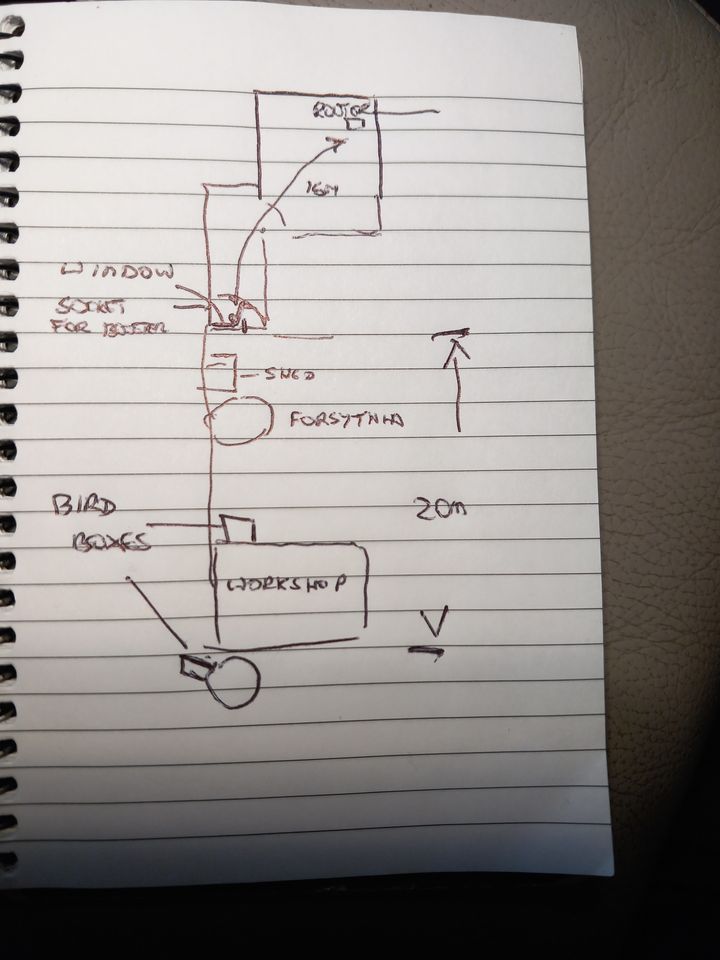
The dimesions are all approx. However the plan view is resonable
The Router is is the top RH corner of the front of the house. The sky box was at the door of the untility type room.
The Netgear 'extender' was in a point in the workshop where the two boxes are sited , one on the front of the workshop, the other on the a tree at the rear. .
I just need a decent 'extender' to reach the netgear in the workshop, as before. I think that the TP link will be a bit of overkill looking at the distance involved
The garage ,which is not shown, and the workshop are on seperate feeds from the main switch box, each with a mini switch box with the lighting and ring main in the workshop ( 5 double sockets!) and the garage has the lighting and just a
single feed to two twin sockets
Mesh setups are more expensive and still do need setting up. But they are pretty ‘fun’ for a computer gadget. I’ve only every used cheapo Tenda ones, started with 3 WiFi3 nodes, than added 4 more (7 intotal). Last year when WiFi7 came out upgraded the WiFi3 nodes to 5 discounted WiFi6 units.
I’ve faffed with powerlines and normal WiFi extenders before, but even the cheap(ish) Tenda units give you a home WiFi network that is far more solid than anything I’ve used before, it allows me to get decent enough WiFi to use the Quest 3 headset in the garden shed which is about 20 meters from the house.
If you want solid WiFi, mesh setups are the right tools for the job.


I’ve faffed with powerlines and normal WiFi extenders before, but even the cheap(ish) Tenda units give you a home WiFi network that is far more solid than anything I’ve used before, it allows me to get decent enough WiFi to use the Quest 3 headset in the garden shed which is about 20 meters from the house.
If you want solid WiFi, mesh setups are the right tools for the job.
Gassing Station | Computers, Gadgets & Stuff | Top of Page | What's New | My Stuff