
Most Thinkpad like desktop keyboard
Discussion


Hi All,
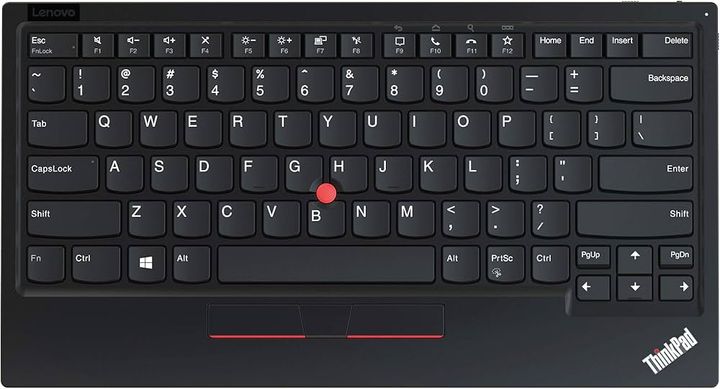
My favourite keyboard is a Bluetooth Thinkpad keyboard I bought back in 2016, following buying a Thinkpad Edge 11 laptop in 2011. Both these keyboards are lovely to type on. Perfectly scalloped keys, good weighting, travel, and feedback.
This is a slightly updated version, but it looks very similar, only in British spec:
I would like to buy a new keyboard to take to work, but I can't find any Thinkpad keyboards for sale. I bought a Lenovo Essentials keyboard, which looks like it has the same keys as the Thinkpad, but they are all mushy.
Can anyone recommend a keyboard that is similar to a 10-15 year old Thinkpad? I have not tried a modern Thinkpad or a proper mechanical keyboard apart from a circa 30 year old one, but found the keys a bit firm and the travel too long for me.
Preferably with a number keypad. Bonus points if it has a trackpoint
My favourite keyboard is a Bluetooth Thinkpad keyboard I bought back in 2016, following buying a Thinkpad Edge 11 laptop in 2011. Both these keyboards are lovely to type on. Perfectly scalloped keys, good weighting, travel, and feedback.
This is a slightly updated version, but it looks very similar, only in British spec:
I would like to buy a new keyboard to take to work, but I can't find any Thinkpad keyboards for sale. I bought a Lenovo Essentials keyboard, which looks like it has the same keys as the Thinkpad, but they are all mushy.
Can anyone recommend a keyboard that is similar to a 10-15 year old Thinkpad? I have not tried a modern Thinkpad or a proper mechanical keyboard apart from a circa 30 year old one, but found the keys a bit firm and the travel too long for me.
Preferably with a number keypad. Bonus points if it has a trackpoint
Edited by AlexC1981 on Thursday 29th January 20:12
Not cheap but they do a version 2 and reviews looks ok. https://www.amazon.co.uk/Lenovo-ThinkPad-TrackPoin...
Or https://www.amazon.co.uk/Lenovo-KBD-TRACKPOINT-KBD...
Or https://www.amazon.co.uk/Lenovo-KBD-TRACKPOINT-KBD...
Edited by AndyTR on Thursday 29th January 20:34
Thanks for finding those, but they are US layout unfortunately and very expensive. I think that model was discontinued recently and the only ones available have doubled in price pretty much.
It was £60 when I bought it in 2016 and I thought that was very expensive at the time, however I must say it's been brilliant. It's been used nearly every day including weekends (albeit light home use) for 10 years and it still works perfectly and the battery still lasts months between charging.
It was £60 when I bought it in 2016 and I thought that was very expensive at the time, however I must say it's been brilliant. It's been used nearly every day including weekends (albeit light home use) for 10 years and it still works perfectly and the battery still lasts months between charging.
I'm mainly a Mac user, but for the occasions when I need Windows I have a ThinkPad (every couple of years I buy a ex-corporate laptop from eBay) and I understand the appeal of ThinkPad keyboards, and the TrackPoint.
I use an Apple keyboard for my Mac Mini that is pretty close to the ThinkPad keyboard (the now discontinued Apple A1314), and a logitech MX Mechanical Mini when I'm using my ThinkPad on a docking station. That's very different to the built-in keyboard but as someone who like ThinkPad keyboards I find that a more than acceptable substitution.
Neither are cheap, the replacement for the Apple A1314 is £80+, £100+ if you want the number pad version, and the logitech MX is £120+ (weirdly the number pad version is currently cheaper than the non-num pad version, both are a lot more expensive than when I bought mine).
If you really, really want the ThinkPad keyboard experience, you can buy the laptop keyboards from eBay for between £15-25 (the older ones tend be nicer, my old ThinkPad T480 has a nicer keyboard than my current T14 Gen 1), and you can get adapters that convert them to USB (e.g. https://www.etsy.com/listing/1890016956/circuit-bo... which should cost than £50 for both, but you'd need some kind of case which kind of turns it into a project.
Unless the TrackPoint is a deal breaker try the apple keyboard if you can find a friend/colleague with one, but as someone who has tried lots of keyboards you really need to try them in person to see if you like them.
I use an Apple keyboard for my Mac Mini that is pretty close to the ThinkPad keyboard (the now discontinued Apple A1314), and a logitech MX Mechanical Mini when I'm using my ThinkPad on a docking station. That's very different to the built-in keyboard but as someone who like ThinkPad keyboards I find that a more than acceptable substitution.
Neither are cheap, the replacement for the Apple A1314 is £80+, £100+ if you want the number pad version, and the logitech MX is £120+ (weirdly the number pad version is currently cheaper than the non-num pad version, both are a lot more expensive than when I bought mine).
If you really, really want the ThinkPad keyboard experience, you can buy the laptop keyboards from eBay for between £15-25 (the older ones tend be nicer, my old ThinkPad T480 has a nicer keyboard than my current T14 Gen 1), and you can get adapters that convert them to USB (e.g. https://www.etsy.com/listing/1890016956/circuit-bo... which should cost than £50 for both, but you'd need some kind of case which kind of turns it into a project.
Unless the TrackPoint is a deal breaker try the apple keyboard if you can find a friend/colleague with one, but as someone who has tried lots of keyboards you really need to try them in person to see if you like them.
A few options there thanks. I saw some recommendations for the Apple keyboard. They might be expensive new, but they are very cheap second hand, however I'm put off those because the keys appear to be totally flat. I have tried keyboards like that before and without the (scalloping?) concave indentation on each key, it's strangely off-putting. My work Dell laptop is like that and I feel like my hands wander around more without the indentations to tell me exactly where my fingers are hitting each key.
I did some reading and my current Thinkpad keyboard has a scissor mechanism with 1.8mm of travel. I managed to find a Cherry KC 6000 Slim open box/unused on ebay for £30 so I have ordered that. It has the right mechanism and has 2.4mm of travel, which I think I can live with. I don't mind not having a trackpoint as I mainly use that for sofa browsing, but I need a number pad for work. I don't mind a separate one.
I'll let you know how I get on with this. I like the backspace arrow above the number pad. That's a feature I have found very handy on my Microsoft Ergonomic keyboard that I'm using at work at the moment. I can't type fast on it though!
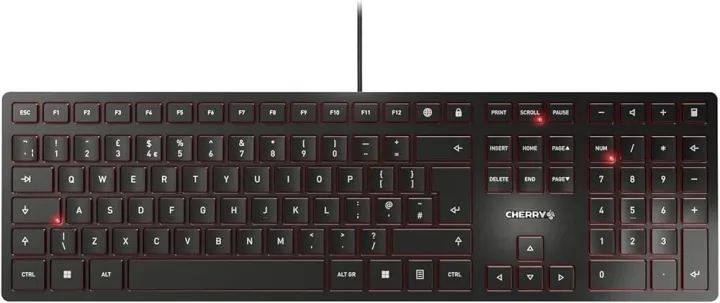
I did some reading and my current Thinkpad keyboard has a scissor mechanism with 1.8mm of travel. I managed to find a Cherry KC 6000 Slim open box/unused on ebay for £30 so I have ordered that. It has the right mechanism and has 2.4mm of travel, which I think I can live with. I don't mind not having a trackpoint as I mainly use that for sofa browsing, but I need a number pad for work. I don't mind a separate one.
I'll let you know how I get on with this. I like the backspace arrow above the number pad. That's a feature I have found very handy on my Microsoft Ergonomic keyboard that I'm using at work at the moment. I can't type fast on it though!
The hunt does not go well. I've never considered myself fussy with keyboards before, but I'm like Goldilocks since I started my search 
Here's what I have tried so far, plus my Thinkpad keyboard I'm trying to replicate:
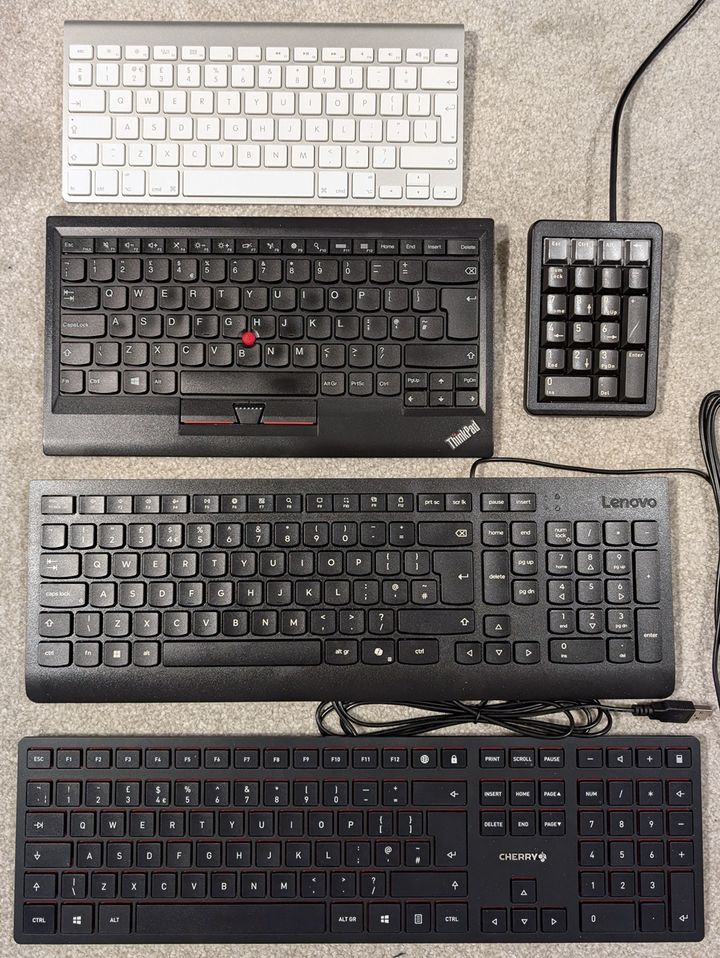
Lenovo Essential: Look like Thinkpad keys, but too mushy. Rubber dome mechanism without the scissor action of the Thinkpad.
Apple A1314: Not a bad effort, but no scalloping and I didn't realise Apple keyboards have some keys, like the @ key in a non-standard British layout. Also, there's no delete key on this model so I can't even log in with it Apparently there is software for this, but I won't be able to use that on my work supplied laptop.
Cherry KC 6000: Too hard. It's like tapping your fingers on a solid slab of granite.
Cherry ML4700 number keypad: Great for a number pad, but I don't think I would like ML switches in a keyboard.
I'll be returning the Essential and KC6000 keyboards. The Apple keyboard is non-returnable, but it was only £15 anyway.
I have been looking into adapting a laptop keyboard to USB, however due to the ridiculous American postage, I would be looking at £20 for the adapter plus £20 postage, as well as the cost of the keyboard. I would need to make some sort of holder for the keyboard and I think it would be quite difficult to make a good holder without going to a lot of effort.
Currently I'm pinning all my hopes and dreams on this:
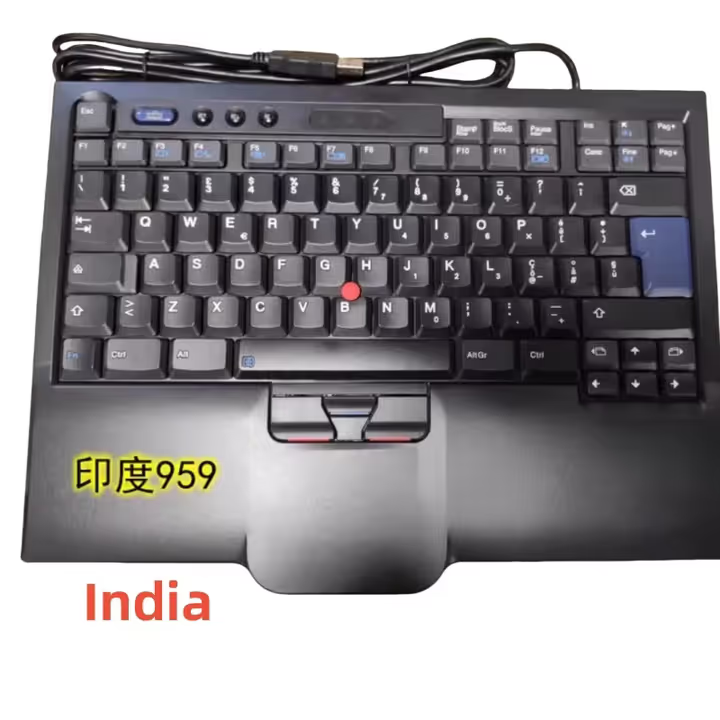
£50 from Ali Express, so it might even be fake. Note there's no Lenovo logo on it. There were only various European plus the Indian layouts available. I will need to re-label the punctuation and some of the number keys, and move a couple around, but the Indian layout needs less work than the European ones would. I don't think I'll be too bothered by the labels as they will not be on the main letters.
I'll let you know what it's like!
Also, whilst I fell down the keyboard rabbit hole, I ended up buying one of these just because I love my Commodore 64
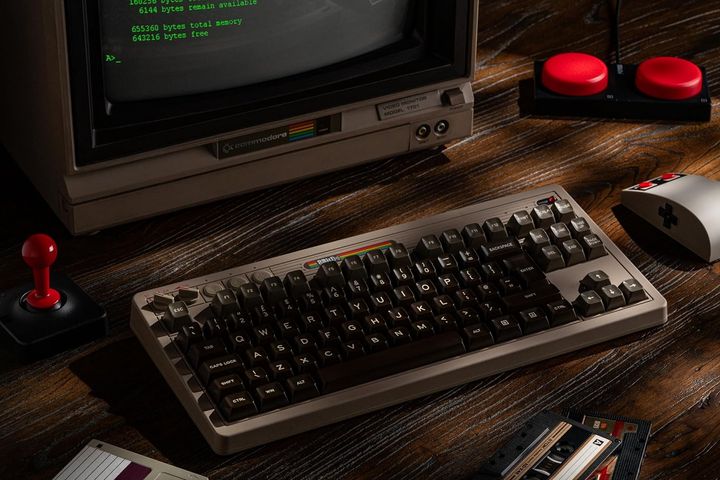
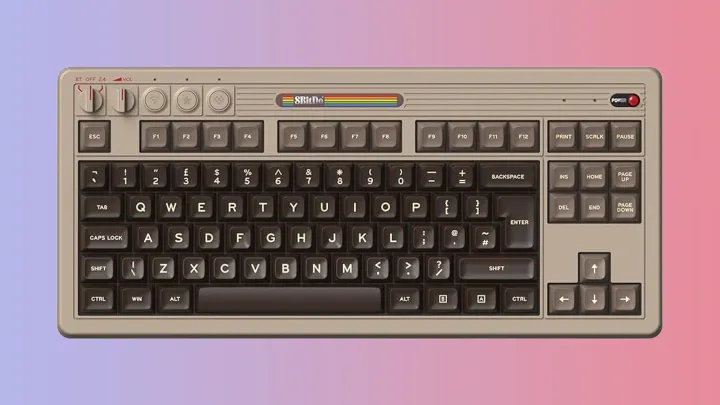
I got the separate matching number pad as well. It uses Kailh white switches, which are decent apparently. I have not tried a modern mechanical switch keyboard before. I'll be keeping this one at home if I get on with it.
Here's what I have tried so far, plus my Thinkpad keyboard I'm trying to replicate:
Lenovo Essential: Look like Thinkpad keys, but too mushy. Rubber dome mechanism without the scissor action of the Thinkpad.
Apple A1314: Not a bad effort, but no scalloping and I didn't realise Apple keyboards have some keys, like the @ key in a non-standard British layout. Also, there's no delete key on this model so I can't even log in with it
Apparently there is software for this, but I won't be able to use that on my work supplied laptop.Cherry KC 6000: Too hard. It's like tapping your fingers on a solid slab of granite.
Cherry ML4700 number keypad: Great for a number pad, but I don't think I would like ML switches in a keyboard.
I'll be returning the Essential and KC6000 keyboards. The Apple keyboard is non-returnable, but it was only £15 anyway.
I have been looking into adapting a laptop keyboard to USB, however due to the ridiculous American postage, I would be looking at £20 for the adapter plus £20 postage, as well as the cost of the keyboard. I would need to make some sort of holder for the keyboard and I think it would be quite difficult to make a good holder without going to a lot of effort.
Currently I'm pinning all my hopes and dreams on this:
£50 from Ali Express, so it might even be fake. Note there's no Lenovo logo on it. There were only various European plus the Indian layouts available. I will need to re-label the punctuation and some of the number keys, and move a couple around, but the Indian layout needs less work than the European ones would. I don't think I'll be too bothered by the labels as they will not be on the main letters.
I'll let you know what it's like!
Also, whilst I fell down the keyboard rabbit hole, I ended up buying one of these just because I love my Commodore 64
I got the separate matching number pad as well. It uses Kailh white switches, which are decent apparently. I have not tried a modern mechanical switch keyboard before. I'll be keeping this one at home if I get on with it.
AlexC1981 said:
Cherry KC 6000: Too hard. It's like tapping your fingers on a solid slab of granite.
Cherry ML4700 number keypad: Great for a number pad, but I don't think I would like ML switches in a keyboard.
I don't know how different it is, and in particular the key feel, but I recently bought a Cherry Stream TKL keyboard (to leave in the office, and because it is there I can't look at the keys to see how scalloped they are - "a bit" is the best I can do.Cherry ML4700 number keypad: Great for a number pad, but I don't think I would like ML switches in a keyboard.
From a quick google I think that the KC 6000 is made to be super slim - the Stream is not huge but is probably a little thicker and might therefore suit you more and could be worth a go?
For a cheap keyboard, I like it a lot.
AlexC1981 said:
Here's what I have tried so far,
Now this is the kind of research I can get behind. That 'Indian' keyboard does have a slight hint of fake about it, as you said the missing branding is ominous, but maybe it fell off the back of the real production line.
Looking forward to an update.
David_M said:
I don't know how different it is, and in particular the key feel, but I recently bought a Cherry Stream TKL keyboard (to leave in the office, and because it is there I can't look at the keys to see how scalloped they are - "a bit" is the best I can do.
From a quick google I think that the KC 6000 is made to be super slim - the Stream is not huge but is probably a little thicker and might therefore suit you more and could be worth a go?
For a cheap keyboard, I like it a lot.
Thanks for the recommendation. The Stream came up in my research and I nearly bought the full size version, but it I went for the KC6000 because it has the convenient backspace button above the number pad. It uses the same mechanism, so I'd imagine it's similar to type on. From a quick google I think that the KC 6000 is made to be super slim - the Stream is not huge but is probably a little thicker and might therefore suit you more and could be worth a go?
For a cheap keyboard, I like it a lot.
GoodDoc said:
Now this is the kind of research I can get behind.
That 'Indian' keyboard does have a slight hint of fake about it, as you said the missing branding is ominous, but maybe it fell off the back of the real production line.
Looking forward to an update.
My bet is that when Lenovo discontinued the model, the factory or tooling in China carried on making them unbranded. It's a very old design that goes back to the IBM days. They have an unbranded European version of my keyboard for £75 too. That 'Indian' keyboard does have a slight hint of fake about it, as you said the missing branding is ominous, but maybe it fell off the back of the real production line.
Looking forward to an update.
Edited by AlexC1981 on Thursday 5th February 22:39
AlexC1981 said:
My bet is that when Lenovo discontinued the model, the factory or tooling in China carried on making them unbranded. It's a very old design that goes back to the IBM days. They have an unbranded European version of my keyboard for £75 too.
That'd be my assumption too. It's not like they're complicated things, but that looks pretty decent and it makes more sense for it to be based on the real tools than for someone to have invested in a creating knockoff of presentable quality. Guess there's only one way to be sure.
If you want proper chunky keys rather than the more modern low profile, perhaps try the Lenovo ThinkPlus Preferred Pro:
https://ebay.us/m/QdV3ay
I’ve been hammering on mine at work every day for 9 years and will mourn the day it finally wears out.
https://ebay.us/m/QdV3ay
I’ve been hammering on mine at work every day for 9 years and will mourn the day it finally wears out.
I recently changed jobs, and had to give back my Thinkpad laptop, and I'd agree that it was pretty nice to type on.
I use Logitech MX Keys when I WFH, and it might be worth a look for you, and there is short form one available too:
https://www.amazon.co.uk/dp/B07W6J7YW6/
I use Logitech MX Keys when I WFH, and it might be worth a look for you, and there is short form one available too:
https://www.amazon.co.uk/dp/B07W6J7YW6/
Be patient and wait for a used Thinkpad keyboard on ebay, they do appear ever so often
Or Cherry Stream TKL for £20-£30
https://www.cherry.de/en-gb/product/stream-keyboar...
Check youtube for review video and keycap sounds
Or Cherry Stream TKL for £20-£30
https://www.cherry.de/en-gb/product/stream-keyboar...
Check youtube for review video and keycap sounds
Thanks for the suggestions! I think I will pop into Currys and try a few. It's a shame there aren't any big PC shops around where you can test them out, however Currys usually have a few in.
I'm really trying to like this, but after years of typing on regular membrane keyboards and Thinkpad keyboards, mechanical keys feel very odd to me. And it is so loud! Listening on youtube really does not convey the racket it makes.
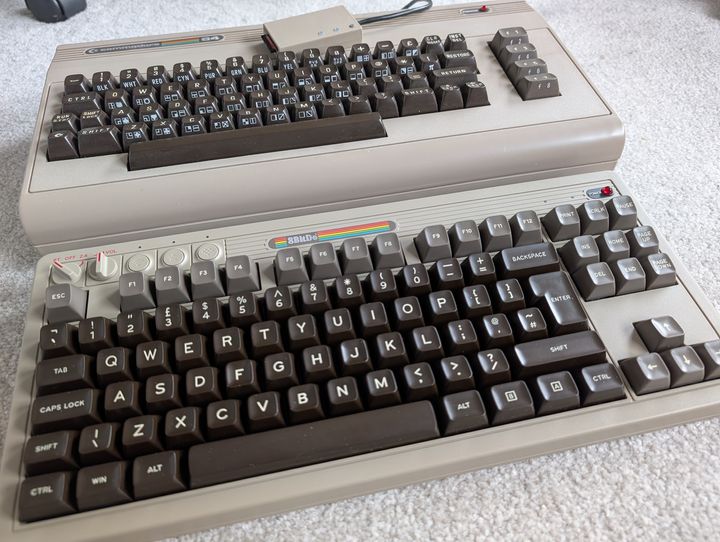
I have been looking at other mechanical keyboards out of curiosity. The Kailh White switches in the C64 keyboard are supposed to be like Cherry MX Blues. The Cherry ML switches I have in my Cherry numberpad are supposed to be similar to MX Browns, only with shorter travel. Based on this, I'm not sure if I would like MX browns either. I suppose I could try an MX red keyboard, but I don't think I would like not having any tactile or audible response at all.
I'm really trying to like this, but after years of typing on regular membrane keyboards and Thinkpad keyboards, mechanical keys feel very odd to me. And it is so loud! Listening on youtube really does not convey the racket it makes.
I have been looking at other mechanical keyboards out of curiosity. The Kailh White switches in the C64 keyboard are supposed to be like Cherry MX Blues. The Cherry ML switches I have in my Cherry numberpad are supposed to be similar to MX Browns, only with shorter travel. Based on this, I'm not sure if I would like MX browns either. I suppose I could try an MX red keyboard, but I don't think I would like not having any tactile or audible response at all.
I should have looked at this earlier. I have one of those bluetooth Thinkpad keyboards. Barely used, has just been sitting around. Dated 2015. Will need to check it still works, but it hasn't been used in years.
If you are still looking.
If you are still looking.
Edited by Monsterlime on Saturday 7th February 16:23
the-photographer said:
Be patient and wait for a used Thinkpad keyboard on ebay, they do appear ever so often
Or Cherry Stream TKL for £20-£30
https://www.cherry.de/en-gb/product/stream-keyboar...
Check youtube for review video and keycap sounds
I bought a TKL Cherry Stream to solve the same problem, as I really like the keyboard on my T480 Thinkpad. It's not quite right (in particular I miss the slight islanding of the keys the laptop has) but the feel is reasonably close.Or Cherry Stream TKL for £20-£30
https://www.cherry.de/en-gb/product/stream-keyboar...
Check youtube for review video and keycap sounds
BTW, if the logistics are feasible, I'd happily save you the space of the Apple Keyboard for what you paid for it....
xeny said:
I bought a TKL Cherry Stream to solve the same problem, as I really like the keyboard on my T480 Thinkpad. It's not quite right (in particular I miss the slight islanding of the keys the laptop has) but the feel is reasonably close.
BTW, if the logistics are feasible, I'd happily save you the space of the Apple Keyboard for what you paid for it....
Agreed, the perfect solution would be for someone to make a "case" for a T480 keyboard with a USB connector.BTW, if the logistics are feasible, I'd happily save you the space of the Apple Keyboard for what you paid for it....
However, the TKL Cherry Stream was the closest I could find after spending hours on youtube and reddit.
Gassing Station | Computers, Gadgets & Stuff | Top of Page | What's New | My Stuff