
Discussion


Afternoon chaps/chapettes.
I have been doing a bit of snooping on Flickr over the weekend and came across some lovley star trail pictures. I was wondering if anyone has any advice on how to capture them. I have so far read that you must have minimal artificial light as that ruins the photo. Luckily I live in Lincolnshire so there are plenty rural settings (old abbey) and a few dark villages with a lovley church I could have as a focal point. Is it just a case of framing your subject, obviously on a clear night with visable stars and having an ultra long exposure? I have a wired lockable remote so there will be no camera shake. I also have a +2, 4 and 8 ND filters, will these be needed?
I have been doing a bit of snooping on Flickr over the weekend and came across some lovley star trail pictures. I was wondering if anyone has any advice on how to capture them. I have so far read that you must have minimal artificial light as that ruins the photo. Luckily I live in Lincolnshire so there are plenty rural settings (old abbey) and a few dark villages with a lovley church I could have as a focal point. Is it just a case of framing your subject, obviously on a clear night with visable stars and having an ultra long exposure? I have a wired lockable remote so there will be no camera shake. I also have a +2, 4 and 8 ND filters, will these be needed?
That just about covers it - you will need to do 10s of minutes to get really long trails so need a foreground that is pretty dark. If you filter using NDs you will also make the dim stars very dimmer.... 
One of the great things about digi-photos is the ability to play without it costing anything(apart from the expensive DSLR!). What does show on these types of photos is the different colours of stars - most people think they are just white and twinkly.
One of the great things about digi-photos is the ability to play without it costing anything(apart from the expensive DSLR!). What does show on these types of photos is the different colours of stars - most people think they are just white and twinkly.
There is a pretty detailed tutorial on Talk Photography, http://www.talkphotography.co.uk/forums/showthread...

When I've done star trails photos I do a timelapse and then put them together in a stacking program -there is one with a very apt name: Startrails.exe!
I don't have any of my photos online so I can't show you but it is easy to do if you have an intervalometer and saves the sensor heating up with very long exposures.
I don't have any of my photos online so I can't show you but it is easy to do if you have an intervalometer and saves the sensor heating up with very long exposures.
Haven't read the tutorial on TP but looks like it references the free stacking software from http://www.startrails.de and there's also a group on flickr for the same application, including links to a tutorial for the software.
Unless you have a particular reason to shoot a single exposure I'd advise to stack - that is, shoot numerous consecutive frames and layer them. With this technique the key benefit is to run at higher ISO or wider aperture- thus recording many more stars without overexposing the sky.
Settings - I tend to seek as many stars as poss (aperture/ ISO) and adjust the exposure length according to ambient light. Under a clear sky, with no moon and away from ambient light you could expect to shoot 30sec at f/1.4. A full moon on the other hand can give you a nice blue sky but that brightness can prevent stars showing through fully and will certainly affect your exposure duration for a given aperture/ ISO pairing.
Good to hear you've got some foreground interest covered - star trails on their own don't make a shot IMO. The moon also makes a big difference to foreground light so have locations lined up that'll give you detail or silhouettes.
To focus, don't rely on infinity. AF on the furthest away light you can see - moon, distant streetlight anything you can manage. Switch to manual focus before you start exposing. Also, ditch any noise reduction built in to the camera - far more effective to expose correctly and remove noise in post if needed. Besides which, NR (even ISO NR) will at least fractionally lengthen the interval between stacked frames so at longer focal lengths small, regular gaps could start to appear.
A final word in favour of stacking if you're a Canon user - they're prone to losing the shot that's being exposed if the battery dies. You really don't want that after 30 minutes in a cold dark field.
Unless you have a particular reason to shoot a single exposure I'd advise to stack - that is, shoot numerous consecutive frames and layer them. With this technique the key benefit is to run at higher ISO or wider aperture- thus recording many more stars without overexposing the sky.
Settings - I tend to seek as many stars as poss (aperture/ ISO) and adjust the exposure length according to ambient light. Under a clear sky, with no moon and away from ambient light you could expect to shoot 30sec at f/1.4. A full moon on the other hand can give you a nice blue sky but that brightness can prevent stars showing through fully and will certainly affect your exposure duration for a given aperture/ ISO pairing.
Good to hear you've got some foreground interest covered - star trails on their own don't make a shot IMO. The moon also makes a big difference to foreground light so have locations lined up that'll give you detail or silhouettes.
To focus, don't rely on infinity. AF on the furthest away light you can see - moon, distant streetlight anything you can manage. Switch to manual focus before you start exposing. Also, ditch any noise reduction built in to the camera - far more effective to expose correctly and remove noise in post if needed. Besides which, NR (even ISO NR) will at least fractionally lengthen the interval between stacked frames so at longer focal lengths small, regular gaps could start to appear.
A final word in favour of stacking if you're a Canon user - they're prone to losing the shot that's being exposed if the battery dies. You really don't want that after 30 minutes in a cold dark field.
Well I went out on Saturday evening as the sky was crystal clear, that was until I drove the 15 miles to where I wanted to shoot, set my camera up and the clouds started to form super quick. Irritated just doesn't describe how I felt as I have been waiting for a couple of weeks for a combination of being off work and clear skies.
Anyway, I had already pressed the shutter release on my wired remote so thought I would test the water and see what I came up with, this was the first result:

Tupholme Abbey Cloud by jimnotjon, on Flickr
The skies eventually cleared so went for the shot again, and created this:
F/3.5, 1085seconds, ISO 100 @ 18mm (18-55 kit lens

Tupholme Abbey by jimnotjon, on Flickr
Soon after this exposure I gave up as cloud formed again, but now I know rougly what Im doing I should be able to collect a fair few exposures and put them together and have a half decent picture, providing the weather stays fine. Out of curiosity (F numbers do confuse me) I only seem to be able to go down to F/3.5 on my camera, is this a restriction with my lens?.. boggo Pentax Kit Lens.
Wasn't a totally wasted night, I learnt alot in the short time I was out, and also re-took a photo I did a few years back, with much sharper results. Getting this printed for a friend by Tim @ Fluid Images asap.

Lincoln Cathedral by jimnotjon, on Flickr
Anyway, I had already pressed the shutter release on my wired remote so thought I would test the water and see what I came up with, this was the first result:
Tupholme Abbey Cloud by jimnotjon, on Flickr
The skies eventually cleared so went for the shot again, and created this:
F/3.5, 1085seconds, ISO 100 @ 18mm (18-55 kit lens
Tupholme Abbey by jimnotjon, on Flickr
Soon after this exposure I gave up as cloud formed again, but now I know rougly what Im doing I should be able to collect a fair few exposures and put them together and have a half decent picture, providing the weather stays fine. Out of curiosity (F numbers do confuse me) I only seem to be able to go down to F/3.5 on my camera, is this a restriction with my lens?.. boggo Pentax Kit Lens.
Wasn't a totally wasted night, I learnt alot in the short time I was out, and also re-took a photo I did a few years back, with much sharper results. Getting this printed for a friend by Tim @ Fluid Images asap.
Lincoln Cathedral by jimnotjon, on Flickr
Edited by JimNotJon on Monday 18th October 15:52
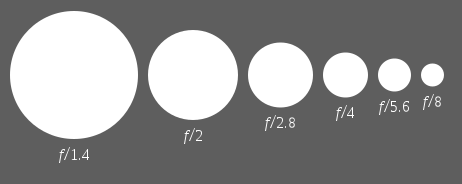
from wiki re f stops:
star trails is on my "to do" list
wiki said:
Diagram of decreasing apertures, that is, increasing f-numbers, in one-stop increments; each aperture has half the light gathering area of the previous one.
widest/smallest aperture should be indicated on the lens, f3.5 is not bad for a kit lens imhostar trails is on my "to do" list

Thanks for that Pox, makes more sense now.
MBH; well the first thing that made my heart skip that night when I turned around with my mag light to find these two glistening things looking at me, then alot more appeard and I was surrounded by sheep. After wafting the torch around like Obi Wan Kenobi they backed off and fell asleep. It did feel really airy though, as do most places in Lincolnshire. I did keep seeing shadowey sillouettes walk across, but I kept telling my self that they were passing cars headlights shining through the trees . It must have some "activity", afterall it was built in the 7th Century.
.
MBH; well the first thing that made my heart skip that night when I turned around with my mag light to find these two glistening things looking at me, then alot more appeard and I was surrounded by sheep. After wafting the torch around like Obi Wan Kenobi they backed off and fell asleep. It did feel really airy though, as do most places in Lincolnshire. I did keep seeing shadowey sillouettes walk across, but I kept telling my self that they were passing cars headlights shining through the trees
. It must have some "activity", afterall it was built in the 7th Century..
Edited by JimNotJon on Monday 18th October 18:36
I have had some succes with the star trail stacker mentioned above:


In the first photo, El Capitan (Yosemite) was moonlit, whilst for the the second one there was no moon to light the foreground. The glow on the horizon is from the soon-to-be-rising sun. Both were stacked from a series of 30 second exposures.
I just wish the skies in the south of the UK were as suitable as those in the US!
In the first photo, El Capitan (Yosemite) was moonlit, whilst for the the second one there was no moon to light the foreground. The glow on the horizon is from the soon-to-be-rising sun. Both were stacked from a series of 30 second exposures.
I just wish the skies in the south of the UK were as suitable as those in the US!
AndWhyNot said:
A final word in favour of stacking if you're a Canon user - they're prone to losing the shot that's being exposed if the battery dies. You really don't want that after 30 minutes in a cold dark field.
This almost caught me out once. I did a 20 minute exposure on my 450D and the camera took about 20 mins to process the image! I had a low battery and this was the last thing I was expecting.Webber3 said:
AndWhyNot said:
A final word in favour of stacking if you're a Canon user - they're prone to losing the shot that's being exposed if the battery dies. You really don't want that after 30 minutes in a cold dark field.
This almost caught me out once. I did a 20 minute exposure on my 450D and the camera took about 20 mins to process the image! I had a low battery and this was the last thing I was expecting.Dogsey said:
Webber3 said:
AndWhyNot said:
A final word in favour of stacking if you're a Canon user - they're prone to losing the shot that's being exposed if the battery dies. You really don't want that after 30 minutes in a cold dark field.
This almost caught me out once. I did a 20 minute exposure on my 450D and the camera took about 20 mins to process the image! I had a low battery and this was the last thing I was expecting.They are fantastic breadknife! On the second one, are those red lines shooting stars or a trail from an aircraft light?
The main problem I found was also the time it too the camera to write the image to the card. Almost the same length of time as the exposure itself. Any tips to get around this? I don't believe my Pentax K10d has any noise reduction features so I am ignoring this. My SD card is a Sandisk Ultra - II if that makes any odds?
The main problem I found was also the time it too the camera to write the image to the card. Almost the same length of time as the exposure itself. Any tips to get around this? I don't believe my Pentax K10d has any noise reduction features so I am ignoring this. My SD card is a Sandisk Ultra - II if that makes any odds?

JimNotJon said:
The main problem I found was also the time it too the camera to write the image to the card. Almost the same length of time as the exposure itself. Any tips to get around this? I don't believe my Pentax K10d has any noise reduction features so I am ignoring this. My SD card is a Sandisk Ultra - II if that makes any odds?
This is almost certainly a noise reduction feature - nothing to do with time to write to the card. The camera is taking making a second exposure of equal duration but with the shutter closed. This exposure is subtracted from the first one to remove any 'hot pixels'. I'd be very surprised if there isn't an option to turn this off - maybe need to resort to RTFM!JimNotJon said:
The main problem I found was also the time it too the camera to write the image to the card. Almost the same length of time as the exposure itself. Any tips to get around this? I don't believe my Pentax K10d has any noise reduction features so I am ignoring this. My SD card is a Sandisk Ultra - II if that makes any odds?
LENR: http://www.pentaxforums.com/forums/pentax-dslr-dis...Short-but-long exposures - c2-4 secs - usually don't invoke noise reduction so if you try something that length and it processes immediately that's your answer.
Gassing Station | Photography & Video | Top of Page | What's New | My Stuff