
A Bit of Photoshop Help Needed
Discussion


Hi All
Took this the other night and got it to 90% of what I wanted ie B and W with the purple flower in colour. However it's still got a faint line of colour around the flower which is peeing me off!
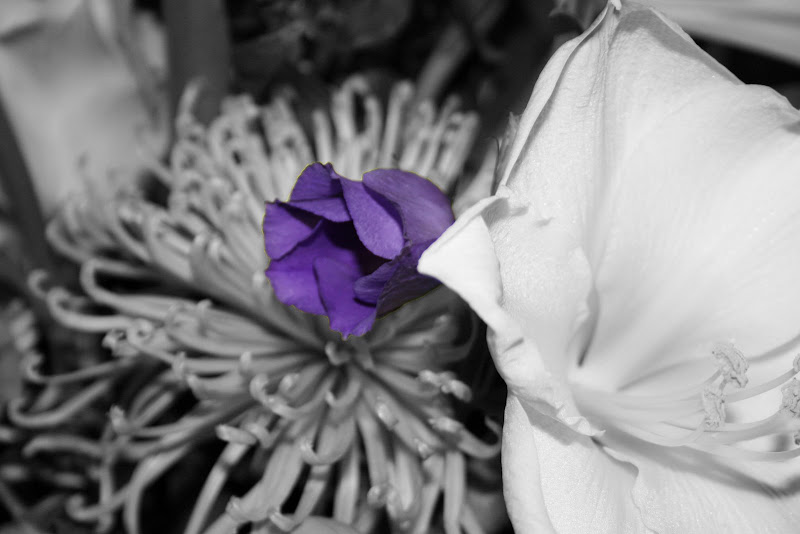
I captured the flower with the magic wand tool - is this where I went wrong, can it be corrected - if so how, and finally is there a better way of doing this sort of thing!
Really appreciate the help here!
ALl the best
David
Took this the other night and got it to 90% of what I wanted ie B and W with the purple flower in colour. However it's still got a faint line of colour around the flower which is peeing me off!
I captured the flower with the magic wand tool - is this where I went wrong, can it be corrected - if so how, and finally is there a better way of doing this sort of thing!
Really appreciate the help here!
ALl the best
David
As SamHH said, or another way is to run the minimum filter (filter/other/minimum) on the mask layer to contract it slightly. There are so many ways to do the same thing in photoshop.
ETA - and if that fails, just use a small paint brush on the layer mask to get it just right.
ETA - and if that fails, just use a small paint brush on the layer mask to get it just right.
Edited by MartinP on Wednesday 14th January 11:30
If you want to select an area really accurately, you'll need to draw a path. They're a bit fiddly (especially if you're not using a graphics tablet), but after some practice they're not too bad.
Alternatively, drawing a Quick Mask works well for less accurate things - just choose the appropriate brush size and hardness. Details will be in the Photoshop Help file.
The problem with automated selection tools like the Magic Wand or Color Range is that they're not very clever, and if you want accuracy you'll spend so much time correcting their selection that you might as well have drawn a path in the first place.
Alternatively, drawing a Quick Mask works well for less accurate things - just choose the appropriate brush size and hardness. Details will be in the Photoshop Help file.
The problem with automated selection tools like the Magic Wand or Color Range is that they're not very clever, and if you want accuracy you'll spend so much time correcting their selection that you might as well have drawn a path in the first place.
Gassing Station | Photography & Video | Top of Page | What's New | My Stuff