
Richmond Park 10.02.08
Discussion


Anyone else there today?


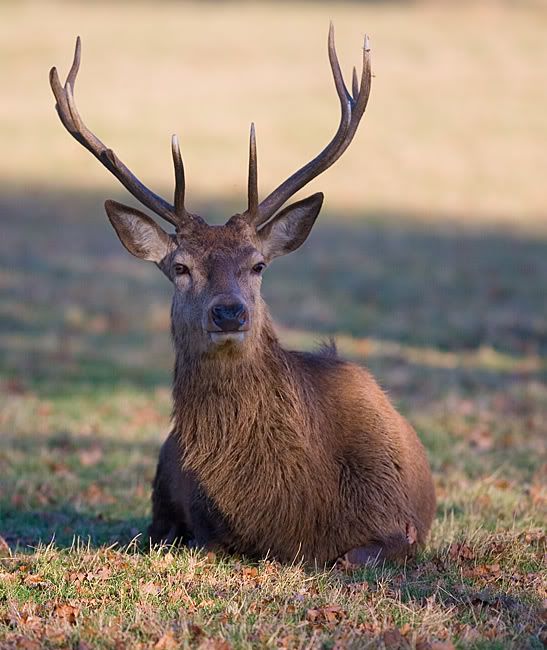
I could spend all day there trying to get photos of the deer.
One thing I found with this batch is that lightroom made a complete hash of the whitebalance of the photos and I couldn't work out how to get it right within the app. Had to pick my favourites and process within capture nx which makes far more pleasing pics with the base settings. Unfortunatly its slow and has a terrible UI. I really wish Nikon would be sensible and work with Adobe on this. Of course it will never happen when they are trying to pimp nx, which whilst offering great processing is a nightmare to use on all counts. Had I infinite disk space I think I'd convert all NEFS to TIFFs in NX and then process in lightroom. Unfortunately that makes every img 50meg + rather than 10meg a piece. Thats not really viable and it ruins my workflow.
So the upshot is that there is a good reason to shoot jpeg. Lightroom doesn't make such a pigs ear of things!
I could spend all day there trying to get photos of the deer.
One thing I found with this batch is that lightroom made a complete hash of the whitebalance of the photos and I couldn't work out how to get it right within the app. Had to pick my favourites and process within capture nx which makes far more pleasing pics with the base settings. Unfortunatly its slow and has a terrible UI. I really wish Nikon would be sensible and work with Adobe on this. Of course it will never happen when they are trying to pimp nx, which whilst offering great processing is a nightmare to use on all counts. Had I infinite disk space I think I'd convert all NEFS to TIFFs in NX and then process in lightroom. Unfortunately that makes every img 50meg + rather than 10meg a piece. Thats not really viable and it ruins my workflow.
So the upshot is that there is a good reason to shoot jpeg. Lightroom doesn't make such a pigs ear of things!
Edited by DanH on Sunday 10th February 22:00
I've very recently moved within a mile or so of Richmond Park and run in it fairly regularly. Being a great believer in the theory of no such thing as too much kit, I often take a little Olympus u790SW with me just in case there's something worth snapping (anything for a rest). Deer, parrots, grey heron and gnarled oak are the usual targets. Trying to get the deer against a contrasting colour is going to be a challenge as everything is shades of brown at this time of year. Maybe the spring will be a bit easier before the plants bulk out? No such problem with the parrots of course.
beano500 said:
DanH said:
One thing I found with this batch is that lightroom made a complete hash of the whitebalance of the photos
You do know they were all taken on manual WB setting in camera? You could have left that on auto if you were going to WB later - or had you tried to custom WB?I know lightroom just best guesses the WB since Nikon started to encrypt it back in the d200/d2 days. It does no one any favours this type of rubbish.
Blukoo said:
I really like the first deer pic. It kinda looks like he's an old man squinting to try and see better.
And I love the last one. Just a pitty there wasn't a silhouette of the deer against a sky like that.
I'm fairly unhappy with all of those pics to be honest. Think I need to work on stabilising the camera shooting at 200mm. I threw away all the ones done with the 2x tele as they were all soft. I don't think its the lens though (at least not to the extent I was seeing), just lack of stability.And I love the last one. Just a pitty there wasn't a silhouette of the deer against a sky like that.
Lots to learn!
DanH said:
beano500 said:
DanH said:
One thing I found with this batch is that lightroom made a complete hash of the whitebalance of the photos
You do know they were all taken on manual WB setting in camera? You could have left that on auto if you were going to WB later - or had you tried to custom WB?I know lightroom just best guesses the WB since Nikon started to encrypt it back in the d200/d2 days. It does no one any favours this type of rubbish.
www.fluidimages.co.uk
[quote=Jenx (V6GTO)]Time to invest in a mono pod young Dan 
And leave my old deer alone...
Martin.
[/quote]
I know. I've actually hit my tolerance for spending any more money on photography for a while though. I can't even contemplate how much I've spent since December! Will probably just go for a tripod though as I need one for landscapes etc too.
And leave my old deer alone...
Martin.
[/quote]
I know. I've actually hit my tolerance for spending any more money on photography for a while though. I can't even contemplate how much I've spent since December! Will probably just go for a tripod though as I need one for landscapes etc too.
ROADRUNNER3 said:
DanH said:
beano500 said:
DanH said:
One thing I found with this batch is that lightroom made a complete hash of the whitebalance of the photos
You do know they were all taken on manual WB setting in camera? You could have left that on auto if you were going to WB later - or had you tried to custom WB?I know lightroom just best guesses the WB since Nikon started to encrypt it back in the d200/d2 days. It does no one any favours this type of rubbish.
www.fluidimages.co.uk
beano500 said:
DanH said:
One thing I found with this batch is that lightroom made a complete hash of the whitebalance of the photos
You do know they were all taken on manual WB setting in camera? You could have left that on auto if you were going to WB later - or had you tried to custom WB?Oh - how confusing!
I'm just reading off the exif data. I expect I'm just being thick here, as mine are perennially set to "auto"; and I read "manual" as a dial in K value (which I suppose is exactly it) but had not considered that a specific setting would give that - for example a daylight setting or whatever.
Lightroom should let you toggle through "As shot" and a number of preset options for "daylight", "cloudy" et cetera - which I usually find are a good starting point before troubling the sliders.....?
I'm just reading off the exif data. I expect I'm just being thick here, as mine are perennially set to "auto"; and I read "manual" as a dial in K value (which I suppose is exactly it) but had not considered that a specific setting would give that - for example a daylight setting or whatever.
Lightroom should let you toggle through "As shot" and a number of preset options for "daylight", "cloudy" et cetera - which I usually find are a good starting point before troubling the sliders.....?
beano500 said:
Oh - how confusing!
I'm just reading off the exif data. I expect I'm just being thick here, as mine are perennially set to "auto"; and I read "manual" as a dial in K value (which I suppose is exactly it) but had not considered that a specific setting would give that - for example a daylight setting or whatever.
Lightroom should let you toggle through "As shot" and a number of preset options for "daylight", "cloudy" et cetera - which I usually find are a good starting point before troubling the sliders.....?
Thats the thing it looks horrible in lightroom with my camera. They have the white balance way off... So in lightroom I develop with WB 'As shot' its cooler and less pleasing than NX. If I swap it to 'daylight' it gets even cooler and less pleasing. Fiddling with the sliders doesn't seem to help either.I'm just reading off the exif data. I expect I'm just being thick here, as mine are perennially set to "auto"; and I read "manual" as a dial in K value (which I suppose is exactly it) but had not considered that a specific setting would give that - for example a daylight setting or whatever.
Lightroom should let you toggle through "As shot" and a number of preset options for "daylight", "cloudy" et cetera - which I usually find are a good starting point before troubling the sliders.....?
Ahah! Just worked out why its so very different. Its because NX is processing the 'vivid' setting which I have on whereas lightroom doesn't. If I turn off to neutral it looks not dissimilar to lightroom. If I can recreate the vivid look easily in lightroom the pics will be 97% as good and thats good enough for me.
Finally got a similar result in lightroom as vivid in camera but its a nightmare as its about 7 different sliders subtly adjusted to get there. Hmm at least I'm on the right track now, which is good as NX is a pain to use. Shame as its results are out of the box in a different league.
Gassing Station | Photography & Video | Top of Page | What's New | My Stuff