
Pics for comment/correction
Discussion


Curious...
They work fine for me!
I'm not an expert (by any stretch of the imagination) and I like the photos, but if I had to make comments...
The first pic looks good, but the sky is a little overexposed as it should be as dramatic as the reflection - not sure the lens flare helps the pic either
Second pic looks good to me - possibly crop out the nearside of the pool though?
Third pic could do with some lightening of the foreground to bring out the boat a little and possibly a crop to remove the overhanging tree...it depends on how you want the picture to look...the framing of the sky is nice, but the overhang draws a bit too much attention for me.
Have a bit of a play with photoshop and see what happens. Obviously I may be seeing the picture in a lightly different way and focusing on different bits.
Good Luck
Alex
They work fine for me!
I'm not an expert (by any stretch of the imagination) and I like the photos, but if I had to make comments...
The first pic looks good, but the sky is a little overexposed as it should be as dramatic as the reflection - not sure the lens flare helps the pic either
Second pic looks good to me - possibly crop out the nearside of the pool though?
Third pic could do with some lightening of the foreground to bring out the boat a little and possibly a crop to remove the overhanging tree...it depends on how you want the picture to look...the framing of the sky is nice, but the overhang draws a bit too much attention for me.
Have a bit of a play with photoshop and see what happens. Obviously I may be seeing the picture in a lightly different way and focusing on different bits.
Good Luck
Alex
GetCarter said:
IMHO
1 and 3 need a ND grad filter or digital blending to get over the exposure issues.
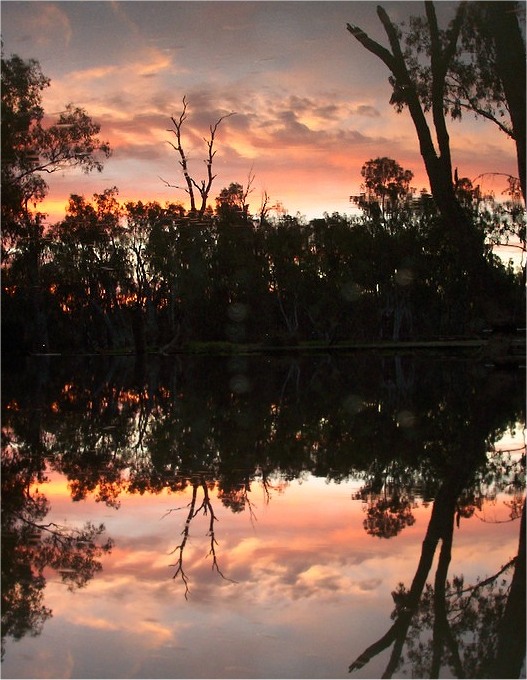
This would get you a sky like this (done in 30 seconds so forgive the output!)
Nice compositions though
1 and 3 need a ND grad filter or digital blending to get over the exposure issues.
This would get you a sky like this (done in 30 seconds so forgive the output!)
Nice compositions though
Edited by GetCarter on Monday 18th December 17:22
Thats great I liked my own pic but thats really brings it to life. I always wondered why the sky was less clear than the reflection.
How did you do that change? and what sort of software would I need to do the same sort of thing.
Cheers
Nick

In the Yorkshire one, your camera has exposed for the sky, so the likely subject (boat) is too dark. Depending on the camera you could use spot metering, compensate the exposure up (knowing that this is likely to happen) or possibly use a "backlight" exposure setting. Sometimes you'll also need fill flash to even up the lighting a bit.
Stuart
Stuart
Nick
Much, much, much better to get the pic correctly exposed in the first place by using a graduated grey (ND) filter in front of the lens which makes the sky darker. Cokin do a set for £39.99 IIRC.
Any photo software will let you do what I did (cut and paste the river onto the sky upside down and mirrored). I used Paint Shop Pro... as it's the quickest.
Steve
Much, much, much better to get the pic correctly exposed in the first place by using a graduated grey (ND) filter in front of the lens which makes the sky darker. Cokin do a set for £39.99 IIRC.
Any photo software will let you do what I did (cut and paste the river onto the sky upside down and mirrored). I used Paint Shop Pro... as it's the quickest.
Steve
Edited by GetCarter on Monday 18th December 20:26
GetCarter said:
Nick
Much, much, much better to get the pic correctly exposed in the first place by using a graduated grey (ND) filter in front of the lens which makes the sky darker. Cokin do a set for £39.99 IIRC.
Any photo software will let you do what I did (cut and paste the river onto the sky upside down and mirrored). I used Paint Shop Pro... as it's the quickest.
Steve
Much, much, much better to get the pic correctly exposed in the first place by using a graduated grey (ND) filter in front of the lens which makes the sky darker. Cokin do a set for £39.99 IIRC.
Any photo software will let you do what I did (cut and paste the river onto the sky upside down and mirrored). I used Paint Shop Pro... as it's the quickest.
Steve
Edited by GetCarter on Monday 18th December 20:26
Steve
Thanks for that
Nick
GetCarter said:
Nick
Much, much, much better to get the pic correctly exposed in the first place by using a graduated grey (ND) filter in front of the lens which makes the sky darker. Cokin do a set for £39.99 IIRC.
Any photo software will let you do what I did (cut and paste the river onto the sky upside down and mirrored). I used Paint Shop Pro... as it's the quickest.
Steve
Steve, Much, much, much better to get the pic correctly exposed in the first place by using a graduated grey (ND) filter in front of the lens which makes the sky darker. Cokin do a set for £39.99 IIRC.
Any photo software will let you do what I did (cut and paste the river onto the sky upside down and mirrored). I used Paint Shop Pro... as it's the quickest.
Steve
Edited by GetCarter on Monday 18th December 20:26
I was about to say hat the ripples in the sky gave that away!
Gassing Station | Photography & Video | Top of Page | What's New | My Stuff