
Family portrait tips?
Discussion


I am planning to do some family photos this weekend - Primarily of the kids, but it'll be of the farm-ily.
I have borrowed a pro "pop up" screen and will shoot against the white background (I think) - I have my D3100 and a 35mm and an 18/70 (I doubt the 55-200 will get any use here), a stand and [i]only[/] an SB600 - I'll bounce light off the ceiling or something and see how that fares.
However, are there any tips and tricks that anyone has - I appreciate that I should have tried to get a big umbrella type flash, but that slipped my mind.
Thanks
JTW
I have borrowed a pro "pop up" screen and will shoot against the white background (I think) - I have my D3100 and a 35mm and an 18/70 (I doubt the 55-200 will get any use here), a stand and [i]only[/] an SB600 - I'll bounce light off the ceiling or something and see how that fares.
However, are there any tips and tricks that anyone has - I appreciate that I should have tried to get a big umbrella type flash, but that slipped my mind.
Thanks
JTW

londonagent said:
The first post? I was hoping that that link might at least be the sixth... 
Put them up against a window and shoot into the light if you want that blown white look, the SB600 might come in handy for some fill. You'll probably not get full lengths this way, but it's either that or some major dicking around with a curves adjustment layer afterwards. Saying that, getting a fun feel will be more important than the amount of stops over the b/g is
Forget the flashgun and use natural light. Find the largest window in house with no direct sunlight beaming through ( north facing is fine) and get subjects to be side on to window. Shoot as wide open as possible with lens to blow background out of focus. For natural shots ask the family to relax and talk to each other , and start shooting.
Example with just window light

Dave
Example with just window light
Dave
Simpo Two said:
That's nice with one person, but how do you get a group of several people sideways on to a window and illuminated evenly? The b/g will also be more of an issue.
Good point. Personally I would use the white background as a white reflector the opposite side of family from window and bounce the light back.To use a single falshgun, if you haven't got a soft box, I would look to rig up large white sheet cotton shoot at about 45 degrees from front of family , and shoot flashgun off camera in to sheet, to make it act as a Large soft box. This assumes shooting in a room with curtains closed etc to manage light.
Couple of links that may be of use.
How to attach soft box to flashgun on the cheap :- http://www.davidjameswilliams.com/photography-chat...
Some example lighting setups :- http://www.davidjameswilliams.com/photography-tuto...
Warning. Once you get into studio lighting toll be hooked
 . Good thing is you can start at around £250 for 2 light setup, that will produce stunning results.
Good luck with shoot
Dave
We have used two sets of 3 of these for a year now in the studio and they are amzingingly good!
http://www.ebay.co.uk/itm/1500Ws-Studio-Flash-Kit-...
consistent white balance, exposure and fast flash; loverly! Oh, and offer £350...
http://www.ebay.co.uk/itm/1500Ws-Studio-Flash-Kit-...
consistent white balance, exposure and fast flash; loverly! Oh, and offer £350...


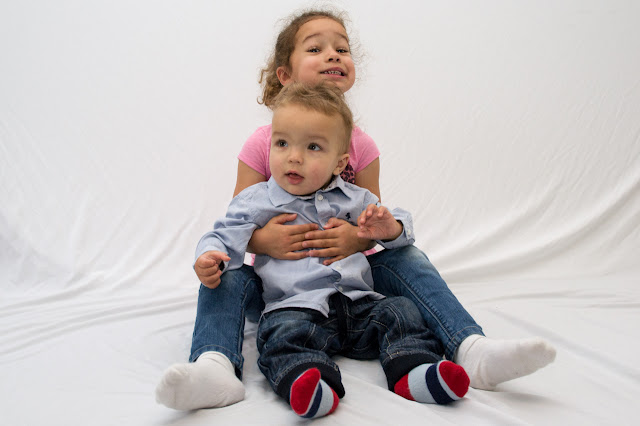


james_tigerwoods said:
Thanks - I don't mind the background so much but I welcome any tips to sort it...
Well IMHO nothing makes a shoot look more amateur than a creased old sheet in the background. Fortunately you've got the subject decently lit so it's just a question of making the b/g white while leaving the subject unchanged. That to me would suggest selection in some way - I might try a polygonal lasso with feathered edge but there are many ways to skin the Photoshop cat. Or, if you like light grey but just want to lose the creases, maybe the clone tool.james_tigerwoods said:
I'm a perfectionist so that'll be my task for the next week or so...
Not sure how I'll manage with my daughter's hair though. ..
There ar a couple of applications out there that claim to be able to do really smart things with troublesome selection layer subjects - hair and tree branches being the more obvious.Not sure how I'll manage with my daughter's hair though. ..
Topaz Re-Mask is one.
OnOne Perfect Mask another.
I seem to recall Adobe claiming advances recently but can't recall where or when nor which product.
Gassing Station | Photography & Video | Top of Page | What's New | My Stuff