
Bit of fundamental Photoshop advice please
Discussion


I'm used to using PS Elements (v9) to edit images, but I'm a complete dork when it comes creating "artwork". If for example, I've drawn a custom shape on a transparent background, what the simplest way to place a "transparent shape" on top of that - e.g. a transparent circle on top of a solid circle to produce an annulus? I've offered to help a friend produce some decal artwork and I'm falling at the first hurdle! 
Simpo Two said:
Why not start with a ring?
Elliptical marquee tool, hold Shift whilst dragging to make circle, then Edit > Stroke and go from there. If you need it on a transparent background, duplicate layer, delete original layer.
Thanks Simpo. My "annulus" scenario was by way of illustration; it's unfortunately a bit more complex than that! What's actually required is an elongated diamond shape. It's orange, edged in black on its inner and outer sides and with a transparent centre (if you can picture what i mean!). I started with a black square, rotated it 45 degrees and then got the correct diamond shape with the Transform tools. I then overlaid a similar (but smaller) orange diamond on that and then other black one on that. I now have the correct basic shape but with a solid black middle rather than a transparent one. Once I've sorted that I've got to reproduce some custom text over the top!Elliptical marquee tool, hold Shift whilst dragging to make circle, then Edit > Stroke and go from there. If you need it on a transparent background, duplicate layer, delete original layer.
My problem (one of many) is that when looking at what's required, I have no mental image of the process required to produce it. It's primarily "trial and error" with an application that I don't find particularly intuitive. I did try your example, but couldn't even get that to work! I think I need to spend some time with some basic PS books and online tutorials!
Simpo Two said:
The black diamond in the middle - as you started with that it's probably the background. Open the Layers window if not already open. Duplicate the background, delete the orignal background, select the offending black diamond and hit 'delete' - does that remove it?
Thanks for the response again Simpo. What I did was to open an image of the "logo" that I'd been sent and enlarged (re-sampled) it to act as a "template". I then started "overlaying" that with the "diamond" shapes to get the correct proportions. The original image is marked as Layer 0; nothing marked a Background.
I've never tried recreating something like that but your template idea seems a good one.
Bearing in mind I'm not a graphics expert, how about tracing over the lines with the polygonal lasso tool (hold Shift to mark two areas) and filling in the resulting area with the colour you want using the colour picker and 'paint bucket' tool?
The S of Kismet could be a bugger though; I suppose the font doesn't exist.
NB I have CS2 so yours may be different.
Bearing in mind I'm not a graphics expert, how about tracing over the lines with the polygonal lasso tool (hold Shift to mark two areas) and filling in the resulting area with the colour you want using the colour picker and 'paint bucket' tool?
The S of Kismet could be a bugger though; I suppose the font doesn't exist.
NB I have CS2 so yours may be different.
McMacro said:
Give me an hour to get home, I'll throw together a psd with the logo/font redrawn. Is the grungy-ness important?
It's easier to see from the psd, rather than me trying to explain how it's done. I'm guessing you can open psd's in elements?
That's extremely generous of you; thanks so much.It's easier to see from the psd, rather than me trying to explain how it's done. I'm guessing you can open psd's in elements?
I'm trying to get a "clean" version without grungy-ness. That's just what it looks like on a 50+ year-old trolley pump! I've had a go at "re-drawing". This is where I've go to so far (overlaid on the image - that will be discarded at the end). As Simpo suggested, I'm stuck on the "S" at the moment!
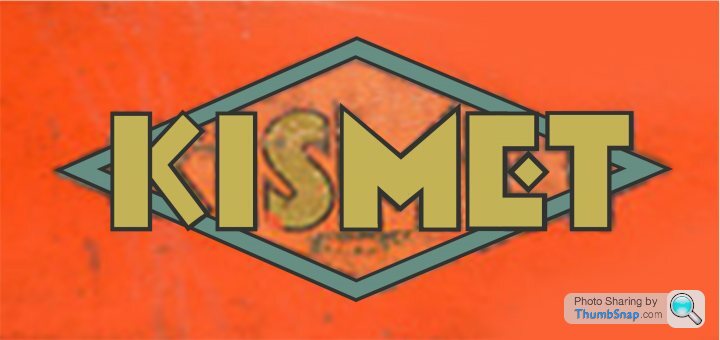
This is the sort of thing I'm aiming at. I saved it in PNG format to preserve the transparent background, but it uploads like this. And yes I know, the "K" doesn't look right!
The idea is that the decals can be applied to some restored trolley pumps ...

The idea is that the decals can be applied to some restored trolley pumps ...
Edited by Ed_P on Tuesday 4th October 18:34
Running out of time, my dinner is almost ready 
The font (especially the S) needs more work, but I've drawn everything as shapes so they can be re-scaled to any size you like without loss of quality.
Here's the png:

and the png overlaying a pump of some sort

and the psd
Off for some food, back later.
The font (especially the S) needs more work, but I've drawn everything as shapes so they can be re-scaled to any size you like without loss of quality.
Here's the png:
and the png overlaying a pump of some sort
and the psd
Off for some food, back later.
Edited by McMacro on Tuesday 4th October 21:19
McMacro said:
Running out of time, my dinner is almost ready
The font (especially the S) needs more work, but I've drawn everything as shapes so they can be re-scaled to any size you like without loss of quality.
Here's the png:
and the png overlaying a pump of some sort
and the psd
Off for some food, back later.
That's really excellent! I tried to open the PSD to have a look, but got a "webpage not found" error. Speak to you later.The font (especially the S) needs more work, but I've drawn everything as shapes so they can be re-scaled to any size you like without loss of quality.
Here's the png:
and the png overlaying a pump of some sort
and the psd
Off for some food, back later.
Ed ...
Gassing Station | Photography & Video | Top of Page | What's New | My Stuff